

Videos
Apple's PDF iPad user guide
iPad Academy: tips and tutorials
Using the iPad for special education (videos)
iPad apps that project via VGA (form to add one)
Slide to Learn: Guide to iOS devices in education
Managing a classroom set of iPads
100 iPad Tips and Tricks
iPad: a magic and revolutionary guide (Bruce)
Considerations for a deployment of iPads
Mobile Mentor workshop
How to put a video in Keynote for iPad
50 really useful iPad2 tips and tricks
General Information about the iPad
Google Apps for the iPad is a small site built by Google Certified Teacher Jill Galloway. The site addresses a lot of common questions about using Google Apps on iPads. Additionally, you will find some helpful tips for first time users of Google Apps on iPads.

EdApps.ca is a site/blog for finding all things educational about the iPad. There are such as: apps, resources, links, and articles for using the iPad (ie, 14 ways to use Garageband in the Classroom).


App Resources
Find Apps when on sale AppShopper website > you can make filters like iPad, Education or select when apps become free and then subscribe
Teachers w/ Apps is a wonderful site for finding in depth reviews on educational apps. What makes TWA so great is that it not only include images, videos, and links of the apps, but breaks down what educational skills are developed.
iPad Apps Categorized by Learning Objectives
- I want my students to record and edit video on the iPad.
- I want my students to record and / or edit audio on the iPad.
- I want my students to read class content on the iPad.
- I want my students to annotate course readings on the iPad
- I want my students to be able to use audio books on the iPad.
- I want my students to use the iPad as a digitial notebook / note-taking device.
- I want my students to use their iPads to create screencasts to share and demonstrate their understanding.
- I want my students to create presentations on the iPad.
- I want my students to create digital stories on the iPad.
- I want my students to be able to study with the iPad.
- I want to use the iPad as a student response system.
- I want my students to create written content on the iPad.
- I want my students to blog on the iPad.
- I want my students to create ePubs / iBooks to read on the iPad.
APPitic - Great site with over 1300 reviews done by Apple Distinguished Educators. These apps have been tested in different grade levels with different instructional strategies.
Apps Gone Free app finds these limited time offers and daily deals. You get information on only 5 to 10 apps per day, curated by the staff. Each app has a brief summary of features. The best part is that after the price goes back up, you continue to get updates for free!
IEAR education apps review database
Mind Leap - Excellent site with reviews built on a five-star scale. Reviews are done on a wide range of subjects and offers a nice breakdown of statistics such as educational quality, engagement factor, and shelf life.
TCEA iPad/iPod Touch educational apps list table of educational apps organized by subject and grade levels. Both paid and free apps are included. Here's a tip: free selections are shaded in the table.
Best Kids Apps - Site with great reviews on iPhone, iPad, and Android apps. These reviews have a basic age rating and a nice image to go along too.
Mac App Store - Probably the most comprehensive list of apps around. This application from Apple is the ideal place to find and purchase apps. Works on Snow Leopard OS and above.
6O iPad Apps for Educators From 3D brains to Google Earth
Fun Educational Apps - Ideal place to find reviews of apps for the iPod, iPhone, and iPad. This is one of my favorite sites to find in-depth reviews with lots of pictures of the app.
Smart Apps for Kids - Designed by a dad on a journey to find the best iPhone & iPad apps. These apps are reviewed on a four-star scale and offer a nice "bottom line" for those who don't want to read the whole review
Best Apps for Kids - Wonderful site that does a great breakdown of an educational app, with reviews done on a scale of one through five. Offers readers advice on whether they should purchase the app or not.
Teachers with Apps - Great site with reviews of apps that include videos and images. Ideal for teachers looking to find that perfect app for the classroom.
Apps in Education - Nice collection of iPad apps that are reviewed by subject. These reviews are brief and to the point.
I Education Apps Review - Designed as a community effort of reviews posted by a variety of users. There are even student reviews to give a unique perspective on the use of an app.
Teach with your iPad - Wonderful wiki that lists a ton of apps by subject, type, and grade level.
Appolearning is a site for finding educational apps. These reviews are done by experts in the educational field and are scored on a scale of a 100%.
SmarTots is a website that hosts reviews of iPad & iPhone apps for young students.
GazziliWorld is a company that designs free iOS apps for preschool aged children. These apps cover: words, puzzles, shapes, and science, w/ math and letters soon to follow.
WeWantApps! This app is ideal for finding any iOS app based on category and price. These apps can be for education, games, books, and more. Also, a person can bookmark their favorite apps and share w/ others.
iPad Apps a catalog for all grade levels

Productivity Apps
Rover – IOS does not display Flash content like interactive content, games, quizzes and more
At the site > Go to About > using Rover > Go to How to use multitouch gestures (different gestures than conventiaonal iPad)
There is a delay when using a flash program and you must you the Rover gestures and not the iPad gestures.
Photon Flash Video Player. - 4.99 If not satisfied with Rover's speed
Graphic Organizers, Brainstorming and Mindmapping apps
GRID With a combination of text, images and more, this app allows users to organize their thinking around a topic using squares on a grid. Customize the size and color of your boxes as you collect your thoughts and conduct research!
Lucidchart is a mind mapping tool that I’ve used off and on for a few years. Now you can get the same features on your iPad. The app is easy to use to create flowcharts, mindmaps, and graphic organizers.
Idea Sketch Good basic graphic organizer. limited number of free organizers
Inkflow is an iPad app for visual thinkers who like to sketch to process what they're hearing, seeing, and learning. Inkflow can be used to sketch mind maps, draw pictures, write free hand, and just about anything else you might do with a pencil and paper. You can organize your Inkflow pages into books. The free version allows you to use black ink only and your books are limited to twenty pages. But you can have as many books as you want in the free version.
T-Charts Pros and Cons helps you organize your thoughts about a question or dilemma. This simple app provides a clean layout in which you can write your pros and cons lists. Each thing that you write on your lists can be given a different weight. Within T-Charts Pros and Cons you can create and manage multiple lists. All of your lists can be emailed to friends for their input and feedback.
Tools 4 Students for iPad (0.99) 25 Graphic organizers
Grafio Lite allows you to design your graphic organizer buy drawing the shapes on
Popplet Lite Simple brainstorming capabilities
Venn Diagram - The Venn Diagram app allows users to compare and contrast information in a visually appealing way. Sounds like a 21st Century Skill useful from fine arts to applied science.
Stickyboard - a whiteboard and sticky-notes for capturing lots of loose information and visualizing their relationships. It's easy to rearrange ideas, see the big picture, and discover important patterns. Stickyboard takes that flexibility and adds the convenience and power of your iPad. Don't worry about losing notes after a meeting.
Simple Mind Easy to use. no graphics or email capabilities.
Mindjet Map lets you easily enter ideas, tasks, and meeting
notes into intuitive visual maps that help you quickly organize concepts
and prioritize action items. Instantly create new maps or import them
from Mindjet Connect.
Tools4Students (0.99) This handy app features 25 graphic organizers for students to use to organize their thinking while reading or preparing to write. Covers all common comprehension skills: cause /effect, main idea/detail, sequence events, pro/con, story elements, characterization, word meaning, plot, KWL and much more. Kids can save to their finished work to the iPad or email them to you. Have kids use it to organize notes while reading or as a pre-write activity.
iCardSort iCardSort is an excellent brainstorming tool that helps you to visually organize ideas quickly and easily. Perfect for the Word Sorts vocabulary strategy, iCardSort allows you to group, order, and explore your possibilities. Can be used as a presentation tool, by groups of students, or individually. Kids can create their own Word Sorts

Backup and Share Files
ShareDrop is a free service that makes it easy to transfer files between devices without creating any kind of account. To use the service just go to ShareDrop.io in Chrome or Firefox (latest versions) on your laptop, desktop, or mobile device. Then do the same on the device to which you want to transfer your file. As long as both devices are on the same wireless network you can then drag a file into ShareDrop on one device and open it on the other.
Google Drive for iPad Google Drive lets you keep all your stuff in one place. Upload all your files from your computer - even the big ones - and you can access them anywhere, including your iPhone or iPad. We get you started with 5 GB free. Although you cannot create or edit presentations you can now view Google Presentations through the Google Drive iOS app. It’s now possible to create student portfolios Set of directions on using the Google Drive iPad app to have students create portfolios. How-to post on the topic here. Guide | another Guide | A Video Guide to Using the Google Drive iPad App | Cheat Sheet for Using Google Drive with iPad
How To Create A Paperless Classroom With Your iPad - good visual guide to using Google Drive with students
How to Privately Share Media from Your iPad via Google Drive
Here is a wonderful step by step guide on how teachers can use Google Drive iPad app to create, distribute, submit, grade and return assignments. The guide starts with setting up a Gmail for students...
Dropbox has an option to automatically upload content stored in the camera roll to an account. This could be a simple way for students to easily share their work with you or the class. DropittoMe a free service that works with Drop Box to allow people to upload files to your Drop Box account without giving them access to the contents of your Drop Box account. SendToDropbox With DROPitTOme you can securely receive files from anyone to your Dropbox account. With DROPitTOme you get unique upload address: www.dropitto.me/username with password protection. Also you will receive email notification when new file is uploaded. When you don't want to receive any files - simply turn off the upload feature. Dropbox Cheat Sheet
DropVox - Record Voice Memos to Dropbox for iPhone, iPad and iPod touch on the iTunes App Store If you want to record voice memos to Dropbox, Dropvox will do that for you.
Instashare Transfer files the easy way, just drag & drop the file and we will handle the rest. Available for iOS and Mac OS X, support for different systems coming soon. overview
While a Learning Management System (LMS) is a great tool for disseminating content to students, because of the lack of file structure inherent to iPad, it is not always the best solution for collecting back work created by students. Two FREE systems that work well for closing the loop in elementary classrooms are Edmodo and Schoology - though they do require that each student have an account. With Edmodo, anything in the Camera Roll can be uploaded and added to assignments or notes which can then either be "turned in" or shared. Schoology, on the other hand, includes the ability to submit projects from almost any app. The video from Jennie Magiera provides a great walk-through of workflow with Schoology.
School 4 One helps teachers manage workflow in their one-to-one iPad classrooms. It was designed to make managing classrooms with multiple devices easier for educators. Teachers can share files and assignments with students who can then annotate those documents from within the app and send the final product back to their teachers. Teachers can then assign grades to each piece of work and leave personal feedback for individual students using audio and visual tools.The user-friendly interface of School 4 One lets teachers easily track student progress and see which areas their children need intervention. With this platform teachers can figure out who needs extra help so that they can make informed decisions about their instruction. School 4 One also has pr made content in a few different subject areas that teachers can access and share with students. two classes free which is good for elementary teachers.
Skaffl is a mobile learning platform for classrooms with access to one to one iPad technology. Whether students use the same devices everyday or share them with other classes in a cart, Skaffl works to make one to one instruction easy for teachers and engaging for students. It was designed by a former teacher and instructional technology specialist to meet the needs of educators in innovative learning environments. The goal of Skaffl is to keep teachers and students organized through an efficient workflow. Teachers can annotate student work from within the app and provide grades and feedback to students. The build in annotation tool gives students the power to complete their assignment in Skaffl, or they can save work from the many other creative apps that save as PDF or to the camera roll, with support for other file formats coming soon. Teachers can view student assignments by class or invidiual child.
WeLearnedIt is the latest offering from eduClipper. WeLearnedIt offers many of the great features of eduClipper along with additional digital portfolio elements. Through the WeLearnedIt iPad app you and your students can create digital portfolios that contain files from Google Drive, Dropbox, links from the web, images and videos captured with your iPad, and whiteboard videos created within the WeLearnedIt app. Applications for EducationThe best aspects of WeLearnedIt are found in the feedback and sharing tools. Teachers can assign grades to elements of students’ digital portfolios. Grading is not limited to assigning scores. Teachers can give written feedback on each submission. Rubrics for assignments are available through the app too. School-wide implementations (a fee-based option) of WeLearnedIt allow teachers and administrators to share assessment data.
Box Box has a clean, simple layout. On Box I can create public and private shared folders to which you can send files that you want others to access. Box on the iPad offers the same features as Box on the web.
Showbie share files including videos and audio files. watch update video
SkyDrive Store your files virtually. Share and manage your files and photos.
Bump Share photos and files by simply bumping two ipads together.
Chirp share files like Bump with a click instead of a bump Must be in the same room.
Skaffl allows teachers to plan, teach and grade using a collaborative iPad workflow solution. It also allows teachers to seamlessly distribute and collect assignments from students. Some other important features of Skaffl include :
PhotoSync - wirelessly transfers your photos and videos between devices and computers. It's the simplest way to move media content to and from your iOS devices. Great for collecting media from students on a teacher laptop. 1.99

Projection
Reflection mirror your iPhone or iPad to a Mac For example, you might use it to use the projection system connected to your Mac 10.6 or higher
Stage: Interactive Whiteboard and Document Camera Stage is a teaching and demonstration tool that students and educators can use to share ideas and interact with curriculum. Use the iPad camera to display live video of objects, textbooks, student work, and other projects, and sketch, write, label, or laser point in real-time. With options like storing labels, recording, and wireless connection to a projector via Airplay, Stage makes lessons fully interactive, collaborative, and engaging
Unique Feature: On a MacBook, LogMeIn on the iPad will display the Application Doc, allowing remote iPad control to quickly open new applications on the MacBook.
Important Note: The computer based program will generate an ID and Password that is entered into the iPad app to take control of the computer remotely.
Air Sketch
With Air Sketch Free, you can project live sketches to your students
using a local computer. This can be done in three easy steps: First
launch Air Sketch, then open the indicated URL in a web browser and now
everything you draw appears in the browser as you draw it.
X-Mirage Mirror Everything From Your iOS Devices To Your Mac $16.00

Screen Capture - Screencasting
Knowmia more creation options than the similar Showme and Educreations apps. (video intro) Some of the highlights of Knowmia Teach app include the option to use your iPad’s camera to record yourself while drawing on the whiteboard. You will appear in the corner of the screen so that your students can see you while you’re talking them through the lesson. The app includes the option to import images and graphics from your iPad to your lessons. You can draw free-hand on the whiteboard screen, type on the whiteboard screen, and insert pre-made shapes and figures. training lessons about using Knowmia Teach.
- Edmodo page
- guide on how to create video lessons
- assignment wizard build assignments using a combination of video lessons, questions, and slides. Teachers can track students’ performance in real-time. Take a look at this sample chemistry lesson then go here to learn how to start using the assignment wizard.
Click here for an introduction to using the Knowmia Assignment Wizard and click here for advanced instructions on using the Assignment Wizard. - you can also submit your Prezi presentations to the Knowmia library.
To submit a Prezi presentation to the Knowmia library all that you need to do is copy the URL of your Prezi and paste it into the "import lesson" field in the myKnowmia tab in Knowmia. Screenshots of the process are available here. - Build Interactive Assignments
Teachers can use the Assignment Wizard to create assignments that include video lessons, slides and questions for your students. Most importantly, they can monitor your students’ progress in real-time, assess comprehension and provide them with feedback. Click here to learn more: http://www.knowmia.com/blog/?p=145 - Empower Students to Benefit from Our Free Tools
Students can now use the free Knowmia Teach iPad app to create video projects and demonstrate what they’ve learned. Student lessons are completely private and secure. Click here to learn more about student content:http://www.knowmia.com/blog/?p=261 - Students will be able to register for an account without an email address. Click here to learn more:http://www.knowmia.com/blog/?p=307
- You can now have your own personalized address on Knowmia.com. For example, www.knowmia. com/teacher/<firstname><lastname> To claim your Knowmia address, login to myKnowmia and click 'edit/view teacher profile.' To learn more about how to create your teacher profile, click here.
Educreations turns your iPad into a whiteboard. You can use the app to illustrate concepts and narrate what you're doing on the screen. You can draw images from scratch on the Educreations iPad app or you can upload images and draw on them. video users can swipe up and down on the screen to increase the white space available to them instead of having to add a new slideYou can use offline. Your completed lesson can be shared directly to others or made public on the Educreations website. Similar to Show Me and Screen Chomp iPad apps. All three of these free iPad apps could be used to deliver short lessons to students. You could also use these free iPad apps to have students develop and share short lessons with each other and you.
Playback is an excellent iPad app for creating screencasts. This is done by giving a user an interactive whiteboard to edit on. Also, a user can annotate over existing slides for Guided Learning. Best of all, a educator has the option to narrate their recordings which is ideal for Flipping a Classroom or for creating presentations such as a Pecha Kucha. All finished movies can then be exported into mp4 files or uploaded into Dropbox.
Ask3 Both teachers and students can create videos using drawing tools and images. After downloading the app, teachers and students both need to sign up. No email address is required. When teachers create a class they’re given a class code that students will need during the sign up process. Currently, teachers can only create one class. (Take a look at the FAQ’s for more information about current and upcoming features.) There three options. Create, Bulletin Board and Class. In Create, you have access to your iPad’s photo library, or you can take a picture using the built in camera. Drawing tools and shapes are provided as well as a selection of colors for using each of these. Record your video using these tools, press on the up facing arrow in the lower right and the video immediately is posted to the class Bulletin Board. video
ShowMe As a student looking to learn about a particular topic you can search Show Me by topic and subject. As a teacher, you can create your own videos or assign one from the community for students to view. You need to be online to use. If you would rather share your knowledge with your class, you will need to download the free iOS app. Video
Within Talkboard you can create projects. Each project can have multiple whiteboards. This makes it a nice tool for students who are working together on a large project. By creating multiple boards within a project students are essentially storyboarding or outlining each phase of their project.
Monosnap download the version that is appropriate for your device. Once installed you can use Monosnap to capture a portion or all of your screen. Like other screen capture tools you can write on your captured images, draw arrows, and obscure parts of the image.
Stage: Interactive Whiteboard and Document Camera. This app works as a document camera and allows you to switch from a whiteboard, picture background, and camera while leaving text on the screen. It also has a laser pointer feature that allows the user to point out details on the screen without leaving a mark on the image.
Doceri Multiple backgrounds can be selected from a built-in library or you can create your own custom background. There are also lots of drawing tools available, including shapes and arrows. Finished recordings can be sorted into folders, saved to the camera roll, or shared to Facebook, Twitter and YouTube. A paid desktop app is available for those looking to annotate a screencast of their desktop from the iPad. video
Splashtop Whiteboard allows teachers and students to turn their iPad
into an interactive white board. Once connected to their computer over
Wifi, they can watch Flash media with fully synchronized video and
audio, control PC and Mac applications then annotate lesson content all
from an iPad. Now interact with students at their desk or teach from all
four corners of the class!
Skitch screen capture with editing and drawing on screen tools Good for flashcards
Skitch now allows you to import and annotated single and multiple page PDFs. New stickers and call-outs have been added to Skitch as well. If you're an Evernote Premium account holder you'll have access to even more features including an annotations summary page.
Vittle lets you easily narrate and
annotate your photos and PDF slide decks to create highly engaging
videos. Some other features that Vittle provides to its users include :
- Annotate and sketch using the ultra-smooth ink of our proprietary Inkflow Engine,
- Resize and move anything around the page,
- Zoom in to focus on key points,
Stage : Interactive Whiteboard and Document Camera a teaching and demonstration tool that students and educators can use to share ideas and interact with curriculum. Use the iPad camera to display live video of objects, textbooks, student work, and other projects, and sketch, write, label, or laser point in real-time.
Soundnote app ipad It tracks what you type and draw while recording audio, so you'll never worry about missing an important detail. While playing back your recording, just tap a word; SoundNote will jump right to that point in the audio.
Screen Chomp must log-in with Facebook. simple to use Do not need to be online.
Animoby Create quality presentations using VOICE and a variety of design tools (draw, paint, type, images), and publish or share via e-mail. Animations are created when users pick a tool and simply touch the screen, and voice can accompany designs by the press of the record button. video tutorials
Explain a Website 0.99 This app acts as an internet browser and allows you to record your actions and voice as you navigate a website. You can write all over the screen, discuss features of the website, and save your recording to your iPads Camera Roll. Check out the clip uploaded onto YouTube that gives a quick introduction.
ScratchWork allows students to view Web pages and take notes as they do. Students can then email the PDF of their notes to you or, if they are just writing about a single Web page, they can create a screenshot of the Web page and their summary or comments.
VoiceThread Create and share dynamic conversations around documents, snapshots, diagrams and videos -- basically anything there is to talk about. You can talk, type, and draw right on the screen. VoiceThread takes your conversations to the next level, capturing your presence, not just your comments
Screen Sharing
Apple TV works wirelessly enabling you to take your iPad wherever you want in your classroom. All you need to do is connect your Apple TV to your projector or TV using an HDMI cable then connect your iPad to Apple TV wirelessly.
Bookmark and Curate Sites
Gooru Collections (gr 5-12) The goal of organizing educational videos and other resources according to subject and grade level. Through Gooru Collections students can find collections of resources for studying and learning about mathematics and science. To find some resources select science or math then choose a subject within either of those categories. Before you open a collection of resources you can preview the material to see if it contains videos, text, or links to websites. Watch a tour of Gooru Collections in this video
Symbaloo allows you to bookmark your favorite websites and arrange them into tile boards that you can share or keep private. Symbaloo calls the tile boards webmixes. You can create multiple webmixes arranged according to topics of your choosing. You could create webmixes about topics to share with your students. Or you could have students create their own webmixes and share them with the class to help everyone learn from each other's research.
Clipboard is a Pinterest-like bookmarking service. The iOS app allows you to select all or part of page to clip to your Clipboard boards.
Diigo for Safari Lets you highlight information on the Web and save to your account Web Highlighter for iPad Safari
-
Highlight the webpage, just like in iBooks
-
Bookmark the page with tags
-
Add sticky note
-
Store bookmarks, highlights, sticky notes in your diigo account
Timelines
myHistro is a timeline builder and map creation tool rolled into one nice package. On myHistro you can build a personal timeline or build a timeline about a theme or event in history. Each event that you place on your timeline can be geolocated using Google Maps. myHistro timelines can be created online or you can use the free iPad app to create events on your timeline. When you first sign into myHistro you will be shown a screen for creating your first event. An event is a stand-alone item. If you want to create a timeline you need to click on your account dashboard then select "stories" to create a story. "Story" is myHistro's name for timelines. Create a story then add events to your story. Each event can include videos, images, text and be geolocated on a map.
RWT Timeline (by Read Write Think) an easy drag-n-drop interface and allows users to add linkable images to text text to create a beautiful looking timeline. Also, a user can create their own profile for saving purposes and share via email or print out via a PDF.
Time Toast timeline generator. With this app, students can add images and text; they can also cite their sources and embed the finished product on any of their favorite social networking sites.

Photo Editing Apps
Pixlr Express Plus provides intuitive tools for cropping your pictures, fixing the light balance, removing red eyes, and changing the contrast of your pictures. Pixlr Express Plus also provides some Instagram-like filters that you can apply to your images. No required an account
PicsArt – Photo Studio is a super powerful photography, image
editing, and drawing app that's like Photoshop, Pinterest, Flickr, and a
professional camera all rolled into one. Some of the numerous functionality includes: camera with time
lapse, burst, front and back views, effects, stickers, backgrounds,
collage, drawing (on photo, blank, or background), thematic contests,
photo search, Facebook integration (find friends, post), artists
listing, networking with other artists (account profile, followers,
notifications, followings, "memboxes," likes, suggestions for
followings), and gallery of interesting recent, and tagged photos.
You Doodle: Draw on Photo one of the best photo editors on
iOS for iPhone, iPad and iPod Touch. You Doodle contains the features of
dozens of other photo editors combined, and is the fastest and easiest
way to draw on pictures for iOS. Create amazing pics and share to
Instagram, Facebook and Twitter and be the envy of all your friends."
Camera+ If you want a little extra control while using your camera and iPad camera, have a look at Camera+. It offers you some tools that are missing on the native camera app. Some of the tools include being able to separate exposer and focus, Surprisingly, there are scene modes just like on your digital cameras when taking photos. There are some great image editing tools too, as well as effects and borders for finishing your images.
Photo Editing Avairy Click here for the free Aviary iPad app.
Click here for the free Aviary Android app.
Snapseed extensive photo editing tools.
Pixlr-O-Matic good for photo special effects Easy to add an effect, overlay and border to get that retro, grunge, clean or stylish look, all in just three simple steps. And with more options than any other photo app, you will never be out of new styles.
Adobe Photoshop Express lets you use simple gestures to quickly edit and share photos from your mobile device.
Fotor This is a great tool where users can upload a image and then edit it with an abundance of different tools, effects, etc. Also, a person can create their own digital card through a wide variety of templates as well as beautiful looking collage. This is a very powerful and user friendly site for all your photo editing needs.
Collages
PicCollage create collages using stickers, text, web images and freeform cut-outs! Provides fifteen frames, including a blank layout, for your collage. You can pick from dozens of background colors and patterns to use on your collage. To complete your collage add blocks of text and stickers to it. When you’re done with your project you can save it to your camera roll, share it to your favorite social networks, or email it and print it.
How to Use PicCollage - And Five Ideas for
Using It In Your Classroom
Photo Collage Creator Good flexibility features
StoryMe lets you design personalized comic strips from your own photos. Create beautiful framed collages with speech bubbles and captions – then apply a unique cartoon filter! Turn individual images into a story in seconds.
Moldiv Collage tool that is simple to use and has got some great features loke text and stamps.
Sadun's Collage You can pinch, zoom, and drag live camera feeds to create art. It also lets you make simple and easy collages of pictures in your library.
PicStitch easily create photographic collages. It is very easy to use and has a user friendly interface.
Turbo Collage Lite Add text to collages
PhotoFunia add a spark to your photos, make them special and more original. In only a few seconds an amazing photo collage is ready, absolutely free. PhotoFunia is so straight forward to use, that anyone, at any age, can use it with ease. Would you like to see your picture on the cover of a magazine or on advertising billboards of Times Square? How amazing will it be to see your portrait on the walls of Louvre or Hermitage museums? Want to try out an astronaut or a Santa suit? Or you prefer something more exotic, just like a dancer at the Rio's carnival? Excited to find out how good you look with a witch's hat or a queen's crown on?
Photo Notes Caption and collage app. One teacher recommends students add captions to demonstrate their understanding of what a fiction character or historical figure might be thinking.
ThingLink allows you to import pictures from your iPad’s camera roll and or take new pictures to turn into interactive images. You can start using the app without creating a ThingLink account. To get started just import a picture from your iPad or take a new picture with your iPad. After selecting a picture tap it to add interactive placemarks. Each placemark that you add through the app can include text and or video links. When you’ve finished adding placemarks you can publish your image publicly or keep it private in your ThingLink account
65 Ways to Use Thinglink
Perfect Captions use this app with primary source documents, but it’s also perfect for reinforcing literacy skills. Have students create captions to record their predictions, to jot questions that they have, or write dialogue for the main character.
Advanced Photo Editing Apps This category of apps allows for more complex editing, such as layers, masks and blend modes.. Some will even allow for editing super large files. These apps are more likely than not to have to be paid for. Prices for these full featured apps can run from free
- PS Touch If you are an experienced Photoshop user you may want to check out PSTouch, it is made by Adobe. The interface is a bit challenging, but with that you get some selection tools, gradients, cloning, masking, layers and blend modes. There are also some very good tutorials built into the app. This is not to be confused with the free PS Express App. The cost for Photoshop Touch is 9.99.
- Filterstorm There is a 5 layer max, if you make a 6th the bottom 2 merge automatically. The price is 3.99 for the standard app and 14.99 for the Pro version. The difference is in file organization and batch processing. Also the pro is dedicated to the iPad where the regular version is universal.
Dermander Create Panoramic Photos 1.99
Dynamic Light simple to yet professional lighting effects capabilities
Photosynth A panorama creation app allowing panorama creation from left to right and also up and down enabling the capture of a full "sphere". Uses interactive capture, advanced stitching, and an immersive viewer.
Tourwrist It allows you take a 360 degree panoramic view of any location and upload it using your iPhone or iPad.
Image Chef Use photo and text templates, or arrange text and stickers manually.
Output as images, animated GIF, or videos
Color Splash (0.99) lets you quickly and easily give photos a dramatic look by converting them to black and white, while keeping your chosen details in color. This effect draws the viewers' attention to the colored areas, creating striking images.
Talk n Photos add text and voice recording to album covers as well as each entry (picture) within an album
Adobe Voice add pictures, narration, and music and save as a video
Funny Movie Maker in you classroom. Use a picture from your camera roll and insert your mouth or entire face to make the image come to life.
Morfo 3D Faces 0.99 create short biographies. Use to create a talking picture of person’s face. You can take a picture of a person or you can take a picture of a picture of a person (think taking a picture of a picture of George Washington). Once you’ve captured the picture you can customize the face by altering the eyes, mouth, and nose to move as you talk. After customizing the picture you can record yourself talking. For example, to create short biographies about historical figures students record themselves talking as if they were the historical figure.
Sphere 360 lets users take panoramic pictures from their iPhone or iPad. In addition to letting users take panoramic pictures, it also gives you the option to search through collections of pictures.
ChatterPix Kids lets your students put their voice to any image with an animated mouth whether it’s a historical figure, a character from their favorite book, or a photo of a friend.
Morfo quickly turn a photo of your friend's face into a talking, dancing, 3D character
Funny Movie Maker Use a picture from your camera roll and insert your mouth or entire face to make the image come to life. 30 second recording.
Bill Atkinson PhotoCard Postcard create custom-designed postcards including text
• Fictional person, Real person, Fictional place, Real place, Object, Event, Vocabulary word
Photography Assignment Generator could be a helpful iPad and iPhone app for photography teachers and students or anyone else interested in taking better pictures. The app provides users with assignments that are designed to help them learn about various elements of photography. The assignments range from using different camera settings like shutter speed and white balance to creative composition prompts. Each assignment includes a description, basic directions, and some sample images to model the assignment. The apps comes in a free version and in a paid version. The paid version includes more assignment prompts.
Smilebox Turn iPhone photos into creations that come to life and tell a story—in seconds. With Smilebox, you can quickly and easily add animation, create collages, apply filters, and enhance photos with captions, frames, stickers, and more.
XnSketch is an iPad app that allows you to take pictures on your iPad and turn them into cartoons or add sketch effects to your pictures. You can also use the app to affect the color saturation and clarity of your pictures.
Toonpaint Create Cartoon paintings from your photos 1.99
Phonto text on image
TinyTap (K-4) allows you to create simple games based on pictures that you take. The purpose of the games you build is to help young students practice identifying objects and patterns. To create a game on TinyTap you upload pictures or take new pictures and arrange them into a set. Then select each image to create questions about it. To create your question press the record button and start talking. When you have finished talking select a portion of your picture to serve as the answer.
123D Catch The app makes it possible to turn your pictures into a 3D model that you can manipulate on your iPad. Click here for Autodesk’s official tutorials.
123 Design Create amazing 3D printable designs, right on your iPad!
123D Sculpt Choose a shape from the library of creatures, humans, vehicles, and more. Then push, pull and paint to make the sculpture your own. When you are done, take snapshots in the camera room or create animated QuickTime turntable movies to upload to YouTube or email to friends.
123 D Creature Create 3D characters like a pro with Autodesk 123D Creature. Design your creature, then sculpt detailed features and paint on skin, fur, feathers, or whatever you imagine. Export your finished creature as an image or 3D model, or have it 3D printed into a real sculpture!
GifBoom: lets you capture and share your moments. It's simple, fast and effortless to create amazing clips with added features. Gifboom combines video and gif editing with social networking features. Multiple capture modes: Stop Motion, Burst, Auto and Timer as well as dozen of vintage real time filters
Moquu: Animate your photos! Create animated GIFs and share them with ease! Moquu helps you simplify the way you do and lets you focus on your creative side to create fantastic loops. On top of that, with our unique MultiMe feature you're going to be able to impress your friends with awesome multilayered photos.
Gif Camera Top #10 Photography App in more than 50 countries! Shoot pics into GIF animations, and easily share to social media. Tap the screen and capture frames from camera, one by one. Tap the play button at any time, to preview your GIF. Feel free to adjust the speed as your animation is playing. Save or share it!
GifMill lets you create animated GIFs and share them via social media. Make animated GIFs with photos from your Camera Roll or take video or photos with your device camera. Adjust the frame speed, and rearrange and delete frames. Save GIFs to your device, or share it via email, text message, Tumblr or Twitter.
PhotoPad This app is very similar to "Instagram", without the social networking aspect. It allows you to edit your photographs using a variety of filters, image adjustments and painting techniques.
Foldify 3.99 is an iPad app that students can use to design all kinds of 3D figures on their iPads. After designing their figures students can print their designs with directions for folding their designs into 3D paper objects. Foldify provides basic templates for objects like cars, houses, and people. Students complete the templates by coloring them in, adding their own pictures to the templates, and adding fun digital stamps to the templates.
Edit & Share app for creating and editing collections of images. By using the app you can crop images, alter the colors of images, and add text notes to your images. You can edit and notate images on an individual basis or create collections of images with notes. Your images can be shared individually or as a group.
Pixntell quickly create simple narrated photo stories. To create a story using Pixntell all that you need to do is start a new project, select some images, place them in order, and then start talking about each of your pictures. You control the timing for each image.When your project is complete you can upload it directly to YouTube, share it on Facebook, or send to friends via email.
Strip Designer 2.99 create comic strips with photos on your iPad

Intro to Programming and Creating Games
My Doodle Game app (gr. 2 - 6) is a fun and creative game making tool, with it you can literally draw your own games and then have hours of fun playing them! Make a scrolling shoot-em-up or a fun platformer, it's so simple to use and the results are instant. The application comes with some pre-made characters and games. You can use these or just draw your own and build up a personal library. You can mix and match heroes and enemies and make some really wacky games. Personalise your games with your own wav sound effects and mp3 music
Hopscotch (gr. 4 - 6) Similar to drag and drop Scratch format. Very simple to get started. Hopescotch Challenge is an eBook on Kindle (free) of challenges for students to complete using the Hopscotch can be used to introduce students to basic concepts of software coding and computational thinking. Download Hopscotch, access the official Hopscotch blog, and get more information about the app on www.gethopscotch.com. These challenges are designed for 9 – 11
- Overview of Hopscotch on Educade (includes video tutorial & block category descriptions)
- Preparing for STEM Lessons on Coding with Hopscotch for iPad (by @wfryer - 10 Nov 2013)
- Hopscotch Lesson Plan by Paul Hamilton
- Hopscotch in the Maths Classroom (by @johnstillitano - 5 Nov 2013)
- Official Hopscotch Blog
- Hopscotch for Young Learners (by @techsavvygirl - 30 Nov 2013
- 3 Video Tutorials by @PaulHamilton8: Lesson 1 Moving character, Lesson 2 Leaving a trail, Lesson 3 Adding Another Object
Cargo-Bot a simple iPad app that turns "thinking like a computer" into a genuinely addictive puzzle game.
LEGO MINDSTORMS Fix the Factory - Learn basic programming and logic skills while issuing commands to help a robot out of a factory maze.
Daisy the Dinosaur! Learn the basics of computer programming with This free app. It has an easy drag and drop interface that kids of all ages can use to animate Daisy to dance across the screen. Kids will intuitively grasp the basics of objects, sequencing, loops and events by solving this app's challenges.
Move the Turtle 2.99 It is easy to navigate, has friendly graphics and instructions, and students see the results of their work right away.
Beebot: The app makes use of Bee-Bot's keypad functionality and enables children to improve their skills in directional language and programming through sequences of forwards, backwards, left and right 90 degree turns. The app has been developed with 12 levels encouraging progression. Each level is timed and the faster it is completed the more stars you get!
Gamepress is an app for creating games. It is extremely easy to use
while giving you the power necessary to bring your ideas to life. It
uses an intelligent drag, drop and connect system for assigning commands
to graphical elements in your game.
Flowlab Create your own online & iPhone games (right in your browser
Cato's Hike: A Programming & Logic Odyssey Cato stepped through and discovered that this world unlike his own didn't follow the same rules. Every time he tried to take a step or an action he'd find himself stuck in place. Stuck that is until he finally discovered the rules in this universe: by writing a program for himself he would be able to overcome all obstacles and learn something new along the way!https://itunes.apple.com/gb/app/catos-hike-programming-logic/id574335479?mt=8&uo=4
Sketch Nation: Creating a game is super simple: Just draw the in game objects, play around with the customization options and before you can say "Sketch Nation Studio," you will be enjoying your own self-created game!
https://itunes.apple.com/gb/app/sketch-nation-studio/id506337826?mt=8&uo=4
A.L.E.X:is a fun puzzle game and a great way to train your brain. A.L.E.X. helps you think and plan logically as you program your robot A.L.E.X. with a sequence of commands to get through each level from start to finish.
Kodable is for programming for ages 5-7 It uses drag-n-drop fuzz balls to move around levels filled w/ directional arrows. There is a paid pro version with more capabilities.
Stencyl - A wonderful site for creating iOS or Flash based games by putting blocks together (i.e. Scratch).
Tynker
features stories that students animate by completing a series of
programming challenges. The programming happens by organizing a series
of blocks that represent commands. In that way it is similar to apps
like Daisy the Dinosaur and MIT's App Inventor.
Tynker website
Teaches you how to makyour first iPhone game! Your game will be written in Objective-C, the language that is used to write all native iPhone apps. You will be using a game engine called Cocos2D that is very popular in the game industry." And all this is done in a browser with an embedded text editor and a Run command that emulates the iPhone environment.

Assessment and Feedback
Socrative turns any device into part of a student response system. If you have BYOD or iPad or any type of 1:1 technology, Socrative is a must use so you don't have to buy a separate response system. Socrative now allows you to add images to your questions and have short answer quizzes graded for you. Additionally, the short answer activity now allows you to display your question on your audience's devices.
New Socrative 2.0 Guide for Teachers
video tutorial
illustrated text tutorial
Common Core Tagging
You are be able to tag all your Socrative assessments with Common Core Standards, making student data even more clear and applicable to your teaching needs. Add sub and superscripts too!
How It Works:
When creating or editing a quiz in Socrative 2.0 (beta.socrative.com), simply click the Add Tag button to select the specific Common Core standard you are testing. It's that easy! The tags you choose will appear at the top of the quiz during creation and editing, and will also appear on your Socrative data reports.
Infuse Learning a response system similar to Socrative. Allows for quizzes and polling students. Also, teachers can include images in their questions. A nice feature is it allows for differentiation by translating or speaking text. Video
Nearpod that teachers can use to
create quizzes, polls, and multimedia presentations. Those materials can be
shared directly to students who have the Nearpod student app installed.
Teachers can view students' responses individually or as a whole class. video
Nearpod Homework. Like the original Nearpod, Nearpod Homework allows you to distribute presentations and quizzes to your students' iPads. The neat feature of Nearpod Homework is that it allows students to work through presentations and quizzes at their own pace in your classroom or at home
GoClass is a free iPad application for creating short lessons and delivering them to your students. The lessons can include annotated images, free hand sketches, text, and video. GoClass gives teachers tools for creating class rosters that they can use to keep track of which students are using the lessons when. Teachers also have the option to ask questions and poll their students. After the students' response have been gathered teachers can project those responses without showing individual student's names.
EDpuzzle is an easy and effective way to deliver videos in the classroom. Video is no longer a passive experience, with EDpuzzle video comes to life with audio-notes and questions. An interactive an unique experience for your students.
eClicker allows real-time responses to four types of questions and compiles results for feedback.
Plickers Plickers is a student response system that uses a teacher’s iPad, iPhone, or Android device in conjunction with a series of QR codes to create a student response system. Students are given a set of QR codes on large index cards. The codes are assigned to students. Each code card can be turned in four orientations. Each orientation provides a different answer. When the teacher is ready to collect data, he or she uses the Plickers mobile app to scan the cards to see a bar graph of responses. Teachers can create and save as many questions and responses as they like. The data collected can be viewed in a web browser or in the mobile app.
ClassPager - Turns your mobile device into a classroom clicker for text messages, responding to polls, and more.
ClassDojo iOS tool for keeping records of students' classroom behavior. The app gives you access to all of your class rosters and all of the behavior reporting tools that you would use in the browser-based version of ClassDojo. You can access all of your classes and give out positive and negative marks to students through the app. You can't, however, create new classes through the app. Helps assess and share student data in a visual way. ClassDojo's YouTube channel
Otus It combines some of the best classroom and behavior management features found in other apps – assessment, polling, split screen, web browser – into one place. Created by two middle school educators in Illinois, this app was designed to solve the problems they faced as teachers in one-to-one iPad classrooms. Users just need to have a Google login to access all features, including a Bookshelf that allows students and teachers to organize resources.
Frolyc a tool for teachers looking to design their own lesson-based activities. Teachers can create activities for students like: completing a graphic organizer, identify cause and effect in a passage, draw a response to a question or take a quiz. Students can access activities that are assigned to them by a teacher using Frolyc’s iPad app Activity Spot. As students complete the activity, teachers will receive feedback on student progress in real time! You can access a library filled with Common Core aligned activities created and shared by other teachers. You can create a unique learning experience for your students. a learning and assessment tool, Froylc is a powerful platform for increasing student engagement and monitoring student progress. Since Froylc lets users assign activities to students individually, it’s easy to differentiate student tasks.
Understoodit web app for quickly gauging your students' understanding of information that you have shared with them. Just open your account and open the simple poll of "understand" or "confused." Students can vote using any internet-connected device. Students can vote whenever you have the poll open. They can vote multiple times too. So if they are confused at the beginning of class, but understand ten minutes later they can change their votes.
Poll Everywhere mobile site allows presenters to create polls and administer polls from their iPads, iPhones, Android tablets, and Android phones. To use the mobile site just go to pollev.com/present in your mobile browser and start creating new polls.
Here are apps that can assist us with tracking students' progress.
Answerables site/app for Gamifying a lesson or Game Based Learning. I like to think of it as a Learning Management System meets Game Based Learning. This takes place in a safe interactive 3D virtual world, where students can collaborate w/ others, go on web quests, complete assignments, browse the web, and much much more. Also, Answerables offers detailed reports for assessment as well as the ability to interact w/ other educators and even tutor in their innovative environment.
PaperPort Notes. Before students send their work to print, use the highlighter and marker tool to show them where edits and revisions need to be made.Write over their work, and send them back to their seats to make changes. The best part is that you can erase your notes once edits are made without losing any of the text on their page!
EQuizShow is a great app for teachers who want a quick and easy way to engage students and have them ready for exams or assessments tests. It allows you to easily create a jeopardy quiz show for your students.
Kahoot is a slick service for creating and delivering quizzes to your students' tablets, iPads, and laptops. On Kahoot you create a quiz or survey that your students respond to through any device that has a web browser (iPad, Android device, Chromebook). Your Kahoot questions can include pictures and videos. As the teacher you can control the pace of the Kahoot quiz or survey by imposing a time limit for each question.
Answer Pad web-based and iPad app Gauge understanding in the classroom while teaching a new concept in the classroom. Engaging students in a hands- on way, giving more reluctant students an opportunity to show what they know during class time, can provide teachers with timely and crucial data that drives instruction, and positively impacts learning.
Classkick shows all your students’ live whiteboards as they work at their own pace on *any* of your content. Then it lets you give instant & individualized student feedback right in the moment of learning.
ForAllRubrics! Once you set up your class list, this website allows users to import rubrics they’ve already made, or easily create new ones. Open the site on your iPad and with a few taps you’ll have projects graded in no time. It’s easy to access previous grades, print out data, and it’s free for teachers
Study Blue Make your own Flashcards Use photos, audio, or text for your vocabulary word.
Brainscape is a site/app that allows teachers or students to create flashcards. These flashcards can be created online and then shared to any iOS mobile device. Best of all these cards can: contain images/audio, can be shared, are ideal for mobile learning, and can be used by any subject. Website link
GotoMeeting backchannel site • Ability to participate in Q&A and ask questions / get answers in a webinar, workshop and lecture. Questions that are unanswered during the webinar are reported to organizers for follow-up offline.
The Answer Pad allows you to set up an electronic answer sheet to a test you’ve already created. Students can then “fill in” their multiple-choice answers by using the TAPit app or The Answer Pad website. Ability to assign a Common Core Standard to each question. Also, w/ their latest feature, Go Interactive, it turns an iPad or mobile device into a Student Response "clicker" system. This takes the whole "clicker" system that most schools use w/ an interactive whiteboard to a whole new level. Now teachers can engage students and assess their learning in real-time w/ no prep work.
Math Champ is a system of two apps working together to deliver math challenges to your students’ iPads.
Quipper is an app for finding or creating quizzes. This app already has a large repository of quizzes but a user can create their own as well. A nice feature is the ability to track your progress on a quiz/subject as well as the detailed explanations around each topic
Three Ring service offers free Android and iPhone apps for digitizing and organizing student work. Using the app teachers can take a picture of a student's work and upload it to a free Three Ring account. Three Ring offers teachers a lot of organizational flexibility. You could organize artifacts by student name, class, date, or just about any other tagging system that works for you.
Quizlet’s free iPad app makes all of their flashcards available to students wherever they take their iPads. Through the Quizlet iPad app students can access their own sets of flashcards or search for those created and shared by others. Through the app students can access their flashcards used even when they don’t have an internet connection. Quizlet flashcards can include audio elements in eighteen languages.
Teacher's Assistant Lite keep track of student actions, behavior, infractions, and achievements in the classroom. Communicate quickly and easily with parents and your administration by documenting student classroom habits and behaviors and sending reports via email or making a call
Evernote While not specifically made for assessment, Evernote works well to collect learning artifacts and make anecdotal notes. Make a notebook for each class and a note for each student. Notes can include text, images, video, audio, and other files. The Evernote app is synced with Evernote for Mac, PC, and Web.
ForAllRubrics Easily find or create rubrics in your web browser. Complete them by going to ForAllRubrics.com in Safari on your iPad. Safari can store and sync rubrics for use offline. You can print rubrics or save a PDF or spreadsheet. You can also have students log in to view their rubrics.
Plickers Poll your students without the need for them to have any devices. Simply print a card for each student to hold up. Pan your iPad across the room so Plickers can scan the cards using the camera.
Infographic: This is Why eTextbooks
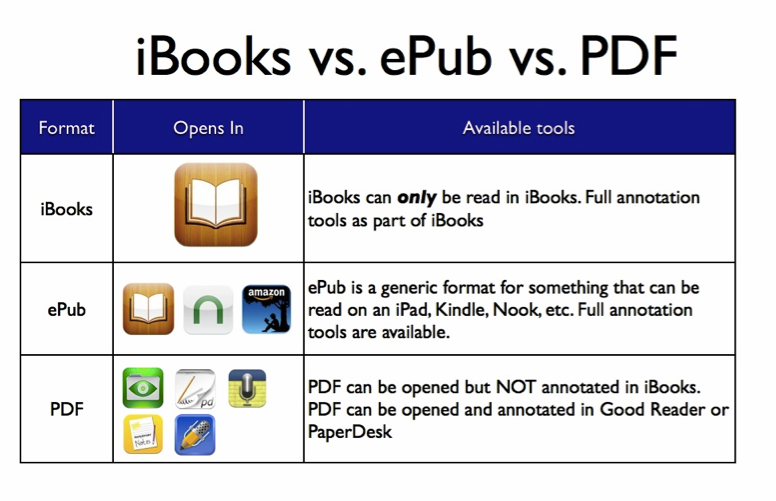
GoodReader a file viewer but also much more. The app supports PDF and TXT files and can handle most other file types: MS Office -.doc, .ppt, .xls,(.docx, pptx, .xlsx), iWork ‘08/’09, HTML, and Safari webarchives, images, and audio/video files. One of its best features is the ability to annotate PDF files. $4.99 pdf/dropbox video
manuals | new features video
Quickoffice allows you to create and to edit Microsoft® Office documents, spreadsheets and presentations on your iPhone and iPad. Once you sign in with your Google Account, work can be saved in Google Drive, which gives you up to 15GB of free storage and lets you access your files from any mobile device or computer.
Free eBooks: This collection includes many children’s classics in ebook format. You generally have the option to download these texts to your Kindle, iPad, Nook or computer. Video tutorials are included on the page. You may also want to visit our resource: Download 20 Popular High School Books Available as Free eBooks & Audio Books.
Oxford Owl is a collection of free children’s ebooks for kids ages 3-11. Each ebook has accompanying audio so that students can choose to read along, or read independently. The books also have activities that focus on reading comprehension and story recall.
International Children’s Digital Library (ICDL)
is an iPad app that offers a plethora of free books specifically
selected for kids and young learners. ICDL features a large collection of children’s books from over 60
countries and in different languages. The books are provided in highly
readable format with beautiful illustrations and graphics. The purpose
behind this project is to “to excite and inspire young readers to become
better world citizens by leveraging technology to reach underserved
children who have little access to libraries.
MeeGenius ebooks for kids. MeeGenius allows users to turn narration on and off for each book. When narration is turned on each word in the story is highlighted as it's read.
MyOn Over 3000 digital books. Some in Spanish
iBook - search the iBook app store
Wattpad Discover and share Free books and stories from around the world. Connect driectly with other readers and writers. Manage fonts, brightness and other settings.
Bookster offers a kid-friendly, easy to use interface that gets young readers learning. It is a read-along storytelling app that reads to your kids, records and plays their voices, and teaches vocabulary along the way. The downside is a limited range of stories available, but we found that the many features available outweighed the limited library.
Kindle Just a wider range of choices than iBooks and very useful when you need that particular book.
Go Social Studies Go (gr 5 - 8) a series of multimedia books about common social studies topics. The site is divided into four main sections; World Geography, World Religions, World History, and U.S. History. Within each section is a series of booklets containing text, pictures, videos, and links to additional resources.
- 2EPUB (site)
- dotEPUB (site)
- Yudu is a free service that allows you to upload PDF, Word, Excel, and Powerpoint files to create online magazines. The page turning effect and the zoom options are all built-in. When your Yudu online magazine is created you can embed it into a blog, wiki, or website. The only drawback to Yudu is that the download option can be hard to find when viewing a document full screen and the download file is a zip file which is a turn-off for some people.
Flipbook social magazine creator video and article

Templates for Pages Pro Templates to add design themes video to get started
Quip a modern word processor that enables you to create beautiful documents on any device, including the iPad, iPhone, and the desktop. It combines documents and messages into a single chat-like “thread” of updates — making collaboration easy.
Fleksy a state-of-the-art text input system so powerful that you can type without even looking at the screen. For the first time ever, sighted, visually impaired and blind people are able to quickly and easily type on touch screen phones and tablets.
Create your own iBooks (video overview) with iBook Author on your Mac for viewing on Mac or iPad You can add videos, animations, 3D and more Video Tutorials | 25 iBooks Author video tutorials | iBook author free textbook pdf version | ePub version
- 10 Video Tutorials The general process behind creating these interactive ebooks is pretty basic; however, there are certain features and tips teachers need to pay heed to in order to tap into its full potential.
- Bookry provides interactive widgets that you can add to your iBooks.
- Middle School students created The Corns Visit the 13 Colonies. It's a piece of collaboratively written historical fiction. The story is about "the Corns" who visit the 13 colonies. Each chapter of the book includes 3D images that readers can rotate.
Moglue Like iBook Author you download the program to Mac or PC and view it on the iPad with its iPad viewer app. Use primarily for creating story books. Video
Bookabi free add text, characters, audio record, import graphics, no drawing capabilities. Simple tutorial
Book Creator 4.99 includes record narration and video options How-to share your book with Dropbox click here
Little Story Creator is a wonderful new iOS app for creating digital scrapbooks or storytelling. As w/ similar apps a user can add text, images/stickers, backgrounds, and even import video into their project. A user can record audio to narrate a story. A finished project can then be shared via email or viewed on the web.
Story Creator To create a page just tap the “+” icon and import a picture, draw a picture, type some text, or do all three. After completing one or all three of those previous actions tap the microphone icon to record your narration. After making your recording you can quickly adjust it so that each word of text is highlighted to match the timing of your narration. to share them with others via email. If you share them via email your recipient needs to have Story Creator on his or her iPad in order to play your story.
Snapguides Search for how-to guides or create your own video
Tactilize a self-publishing tool and content network. The Tactilize app now features an easy-to-use editor that lets you add photos, videos, text, and links to external content to your pages.
Creative Book Builder (gr. 6-12) 3.99 Similar to Book creator, but no drawing tools. video tutori

Tripod to hold iPad

Video
Loopster Closest free alternative to iMovie. It provides a four track editor. There are tracks for video and images, transitions, sounds, and text. You can import images and videos from your iPad’s camera roll or shoot a new video with the app and edit it. On the video editing track you can trim clips and combine clips. On the text track you can add speech bubbles and other text effects. Loopster has a slow motion effect that is available on the iPad app too.
Videoshop Through the app you combine video clips and images into one video project. You can import video clips and images from your iPad’s camera roll into your project or you can capture new footage through the app. After adding your video clips and images to your project you can edit each of the clips by trimming their lengths and adding slow-motion effects. To the pictures and video clips in your projects you can add voice-overs, background music, and text. Transition effects can be inserted between each clip and picture. The last step before publishing your video is to choose Instagram-like visual effects to your project
TeleStory takes you behind the scenes to create and broadcast your own TV show! Record a music video, teleport to an alien planet, film a high-speed-chase, or perform on a reality TV show - TeleStory is a TV studio in your pocket.
Together Learn, the app provides the chance for multiple people, in different places, to watch the same video in real time while at the same time having live video / audio chats while at the same time using a live shared chalkboard. The app lets you fast-forward, rewind, skip chapters, and pause a wide variety of videos while it lets you video conference. Think interactive Skype conversation with a cool video playing in the background that is the focus of the conversation.
Hyperlapse Create time lapse videos with Hyperlapse. Using Instagram’s in-house stabilization, Hyperlapse shoots polished time lapse videos that were previously impossible without bulky tripods and expensive equipment.
Easy Studio this app allows users to create animations and videos on their iPads using shapes and and cartoons.
Youtube Capture Create beautiful movies on the go with YouTube Capture 2.0. Start recording in a snap, then edit and share videos of any length right from your phone.
Features:
* Capture the moment: Start recording instantly
* Stitch together an unlimited number of clips as you build your story
* Trim and rearrange clips right from your phone
* Add a soundtrack from your music collection or YouTube’s audio library
* Touch up videos with color correction and stabilization
* Upload to YouTube and share on Google+, Facebook, and Twitter - all in one step
Augment is a platform through which you can upload images to have them turned into 3D models that your students can then view through their iPads or Android tablets. The 3D models that are displayed are referred to as "Trackers" on the Augment platform. Watch the video below to see them in action. iPad app free
Ubersense Coach records video and plays it back in slow motion, so you can analyze physical performances frame-by-frame.
Video Star is a music video creation app. To create a music video on Video Star just select a song that you have stored on your iPad then start shooting live video. The music will play for as long as you record or until the end of the song. You can also import images from your iPad to create your video. Video Star also lets you apply special effects to your video. Some of the effects that you can apply include text boxes, title boxes, frames around images, transitions, and split screens.
Your completed Video Star video can be exported to YouTube
Coach My Video allows coaches to video their players in action to provide feedback on their movements and techniques. With Coach My Video installed you can record a video of your player(s) in action then as you play the video back you can pause it to annotate the the video frame-by-frame. You can draw on the video to illustrate a movement or to point out something that needs correction.
Coach's Eye You can’t fix what you can’t see!Video capture with slow-motion review, drawing tools, and simple sharing. “The ability to film, evaluate, review with the athlete and then send it to them without leaving the deck has never been easier.”
Storyboard Creator create storyboards with drag and drop elements
Time lapse video OSnap is an iPad app (available in a free version and in a paid version) that you can use to create stop motion and time lapse videos. The app is quite easy to use. To create a video with the OSnap app you simply need to start a project and take a series of still pictures using your iPad’s camera. Then adjust the number of frame per second to edit your video. If you want to, you can add a sound track to your video by selecting audio files that are stored on your iPad.
Youtube Capture Film a video and instantly make it YouTube-ready with background music, auto color correction, and auto stabilization. You can upload your video to YouTube and share to Facebook, Twitter, and Google+ at the same time.
Reel allows you to create, edit and share movie clips on your iPad. Smooth or blend transition between scene changes are its biggest feature but it also does Ken Burns, text overlays, music imports and voice over capabilities. A great storytelling app.
iMotion HD an intuitive and powerful time-lapse and stop-motion app for iOS.
Take pictures, edit your movie and export* HD 720p videos to your device or directly to Youtube...."
Video Editor Free add photos, music, voices, and transitions to your videos to create awesome slideshows. It can also help you trim, merge, and share your video clips.
Storehouse It is an app for telling stories through collages of your pictures and video clips. The basic idea behind Storehouse is to create stories by combining images, text, and video clips on a blank canvas. You can now allow commenting on your stories. The commenting feature could be useful for giving students feedback about their stories.
Cartoonatic - Toon Camera, Sketch & Art FX for videos and photos Cartoonatic ads amazing cartoon, sketch and art filters to your videos. Plus you can change video speed, add soundracks and apply cartoon filters to your pictures. It's fun and creative.
Story Story allows you to pull in pictures and videos from your device’s camera roll and arrange them into photostory books.
Video FX Live With its HUGE variety of real time video effects,
ACTION MOVIE FX lets you add Hollywood FX to iPhone AND iPad movies that YOU shoot!
Magisto is a fun and easy way to automatically edit videos and photos and share them with your friends and family. Magisto will turn your video and photos into beautiful edited movies, complete with music and effects, in minutes. Create sensational movies using as little as 5 photos.
Perfect Video is the easy to use video editing app for quick and straight forward editing. With help of it, you can quickly trim, merge, add subtitles, add photos, add text, pick transitions, add music and export your video clips. Its simple lay-out and workflow does not need any explanation.
Cute CUT
Now you can DRAW a movie! Do you want to create your own unique movie? Just draw it by yourself with Cute Cut! Beside providing the utilities of a common video editor, Cute Cut gives more than you expect. Just drag and drop, you can arrange your media segments easily. Supports both portrait/landscape.
Splice together HD photos and videos in an amazingly simple way. Add music tracks from your iPod library, sound effects, transitions, borders, effects (like Ken Burns, slow motion and fast forward), trim video and audio, narrate with your own voice, and much more.
YouTube iOS app. You can quickly record videos and upload them to YouTube with just a couple of taps on your screen. The first time that you open the app you will be prompted to sign into your Google account and choose your sharing settings. YouTube Capture includes a few options for quickly editing and enhancing your videos. Within YouTube Capture you can trim the length of your video, stabilize the images in your video, add a soundtrack to your video, and touch-up the colors in your video. YouTube Capture isn’t going to replace a true video editing tool like iMovie, but using YouTube Capture could be a good way for students (13 or over) to create short video observations of things that they see on field trips. It could also be used by students to record and share short video blog entries.
Alternatives to Youtube app
Vodio Vodio tracks videos as they’re shared by thousands of people and sources around the world, and organizes them into categories, including: most popular, entertainment, tech, music, sports, news, comedy, science and more. Simply swipe through Vodio’s huge variety of channels and discover videos to enjoy – anytime, anywhere. You can also create personalized video streams to suit your preferences.
iTube iTube allows you to organize youtube videos in playlists, view history of watched videos and bookmark videos.
Features:
- Play Top 100 songs or top 100 from different generes.
- Manage YouTube playlists: Create, rename or delete.
- Search music videos by keyword.
- Rotate to full screen play mode.
- Skip songs with headphones or iPod controls.
- Double Tap on video to zoom in and out, one tap to dismiss controls.
- Works on background.
- Jasmine This is a full-featured YouTube client for iOS. Here is a list of some good features:
- Full support for managing playlists
- Remembers your position when returning to long videos
- Parental Controls to curate content and restrict video discovery (PRO)
- Browse and discover channels
- Post comments and replies
- Aggressive filtering for comment spam and channel promotions
- Share videos via Twitter & Facebook
Squrl It is the one place to discover and watch videos from the most popular content sources available on mobile today. Squrl is also the only mobile service to deliver personalized recommendations based on users interest and viewing behaviors, and the only search engine on mobile integrating both free and premium video including YouTube, Netflix, Hulu, TED, Vimeo, Aol, Blip.tv, Facebook, Twitter, and more.
Brainfeed has a fantastic app with tons of free content for streaming educational videos. There are clips on theenvironment, the human body, and even geometry. A subscription lets users access the entire library, but this app has plenty of content for you to view with the free download.
Lego Super Hero Movie Maker Build your LEGO® Super Heroes adventure, then capture your story!
Video Star makes you and your friends the stars of awesome music videos. There's no other app like it! Select from hundreds of built-in effects. Then add Power Packs to crank up the awesome. Create "backwards" clips, act along with "clones" of yourself, and make awesome stop motion and green screen effects. Pause at any time to set up a new scene. No matter how many scenes you shoot, the music stays in perfect sync.
Convert Video Files for iPad
iConvert Convert video files to use on iPad

Organization
Evernote Organizational Create text, photo and audio notes that auto-synchronize your notes to your Mac or PC. Makes text within snapshots searchable. Add, sync, access, and share files (PDF, Word, Excel, PPT, and more) among the different versions of Evernote. **For preparing your next presentation! Try sketching out your presentation and gathering research with this app! Evernote for Schools is a micro site on the Evernote page that has useful resources to help educators and students use Evernote more effectively as an education tool. It has a collection of resources including education-related case studies, videos, and a discussion forum for connecting and sharing tips and ideas for using Evernote in a school setting. Evernote for Educators resources Users Guide | 6 Apps You Should Be Using with Evernote | More tutorials | 5 apps to use with Evernote
Evernote video tutorials and more
- Voice2Note is a fantastic way for students to turn their Evernote voice notes into text. Students record their voice (just like they normally do in Evernote), Voice2Note takes that note and converts it into text. Students can even tag their notes by saying “Tag with” at the end of their note! Now students can search even their voice notes! To use Voice2Note, students need to login to the Voice2Note website to register and connect their Evernote account. Then, students just record their voice note as they normally would. Many students have fantastic ideas but struggle with getting their ideas out in writing. Voice2Note means that they can say their ideas, have them transcribed into text directly in Evernote, and edit from there. Not only is this ideal for struggling writers, it is also helpful for emerging writers who may have a large spoken vocabulary, but their writing is limited by what they know how to spell.
- Postach.io is a slick blogging tool. Postach.io allows you to blog from your Evernote account. To blog through Postach.io you authorize it to access Evernote on your behalf. Once authorization is granted Postach.io creates a notebook called "Postach.io" in your Evernote account. Then to write a blog post you simply write a note or send a note to the Postach.io notebook in your Evernote account.
- Evernote Clearly
This is another great tool to use with your Evernote, Clearly clears away the distractive features from web pages and makes blog posts, articles and webpages clean and easy to read. it also allows you to save your clean version to read later. - Evernote Web Clipper
This is an extension I have installed on my Chrome browser and which allows me to clip any web content and save it to my Evernote account to read it later. This tool also provides you with a set of mark-up features that you can use to annotate your clipped content. You can also share what you have clipped with others through a generated link, via email, or through the popular social media websites.
Three Ring is a new free service offering iPhone apps for digitizing and organizing student work. Using the app teachers can take a picture of a student's work and upload it to a free Three Ring account. Three Ring offers teachers a lot of organizational flexibility. You could organize artifacts by student name, class, date, or just about any other tagging system that works for you.
Edmodo Customize your classroom and revolutionize the way you connect with your students (and their parents) in a private, closed community. Create a virtual classroom and add your students. Once you do this, you’ll be able to share content, upload homework assignments and notifications, and continue discussions
Photos for Class with it
installed on your Edmodo group your students can search for Creative
Commons licensed images and download them with citations attached to
them. In the video demonstration of how to
install Photos for Class. The second half of the video demonstrates a students' perspective of using Photos for Class within Edmodo.
Handouts creation, distribution, collection, and grading of worksheets, printables, homework, quizzes and assignments.
Otus is a innovative new mobile learning system for the iPad. Educators can track assignments, assess students, poll, browse the web, take attendance, and more. It is a complete all-in-one solution for the mobile learning environment. Educators can even "flip" a lesson for at home instructions. Also, the simple to use split-screen allows students to take notes while working on assignments.
Canaryflow
is designed to help teachers and students follow a simple workflow
inside and outside of the classroom. With this tool a teacher creates a
lesson, adds an assignment, and schedules the lesson. Students access
the lesson and assignment, and submit the work for the assignment.
The teacher then collects the assignment, annotates and grades the
assignment, and publishes grades. Students can then review grades and
annotations.
Teacher app
Student app
Drawp for School is a powerful app for tablets that works on both iPads and Android devices. It’s easy-to-use and contains tons of great features for promoting a collaborative learning environment in your classroom. Students can work with their peers by easily swiping across their screen. This action lets them share their creations with anyone in their class. Drawp for School and this includes how easy it makes workflow in an iPad classroom. With Drawp students can swipe across their screen to turn in work or share with others. They can easily send their creations to teachers, other students in their class or even their parents if teachers allow it. When teachers want to push work out to their students all they have to do is tap their screen. With a touch of a button all students are sent assignments from the teacher. Teachers can see the flow of work as students share it with each other before it comes to them. Also the work that is submitted is automatically sorted by class and student.
Weebly’s free iPad app allows you to create a new website from scratch. After creating your website with the app you will be able to manage nearly all aspects of your site from your iPad.
Handouts is a paperless student/teacher platform for tablet-centered classrooms. With this app teachers can create handouts to distribute to students by taking a picture of a paper activity sheet or importing digital files they’ve already made. Teachers can select which handouts they want to distribute and send them to the whole class or individual students.
ChallengeU is an online educational platform that allows teachers to create and share learning activities. Teachers can make content available to students anywhere at anytime, and ChallengeU is compatible on all devices and completely free. Teachers can upload different file types and student questions all in the same activity. Students can then hand in assignments in the form or videos, audio, pictures and a handful of other file types. They can even comment on the work of their peers and develop online learning communities. Teachers can track students progress and instantly let students see comments, corrections and feedback on assignments.
School 4 One is a tool for teachers managing a one to one iPad classroom. Their learning platform can transform your workflow by placing cloud storage and feedback tools all in one place. Teachers can track their students’ performance as they address the Common Core State Standards. School 4 One makes it easy to assign schoolwork to students and collect their assignments.
Frolyc as a tool for teachers to design lesson-based interactive activities.
Skaffl It was designed by a former teacher and instructional technology specialist to meet the needs of educators in innovative learning envornments.The goal of Skaffl is to keep teachers and students organized through an efficient workflow. Teachers can annotate student work from within the app and provide grades and feedback to students.
Chalkup provides tools to help students work and study together. Kids can collaborate with their peers through the online platform to complete projects and correspond with one another. Students can also pose questions when they are struggling to understand an assignment or a core concept. Chalkup gives teachers the power to create an environment where students are not passively taking in a lecture. They are engaged, on task and growing as learners.
Easy Portfolio create portfolios of your work and or your students’ work. You can create multiple portfolios containing pictures, videos, links, notes, documents, and audio recordings. You can import files from your iPad to any of your portfolios. You can also create new media from scratch within each of your portfolios. You can share individual portfolio elements or entire portfolios via email or Dropbox.
Snapguide create your own guides and use others at the site by using the search. There is a guide on how to use Snapguide.. You can include photos and videos in the guides. Teachers and students can create "How to" guides
Flipboard curates sites and organizers similar sites in a flipboard format
Readdle Documents Excellent organiser for your files... documents, pdfs, eBooks, the cloud & the web Guide
Collaboration and Communication
Real-time Collaboration Apps for the iPad real-time collaboration apps to enhance instruction. The most popular of these include the whiteboard apps, most of which work when connected to the same wireless network
Remind 101 free iPhone app.is a service for sending text messages to groups of students and their parents. The service is an opt-in service which means that students and parents have to enter a confirmation code to state that they do want to be contacted by you through the service. Remind 101 keeps phone numbers hidden so that the parties cannot see each other's numbers. Learn more about Remind 101 in the video below. video
ViewChat is a
free collaborative app designed to allow you to easily share content
with one another. ( video overview ) What makes this app particularly special is the text,
chat, and voice features available while you are reviewing documents or
any other content. The simple and easy to use interface allows you to
drag and drop photos, PDFs, Office and iWork files, videos, web pages
and emails for everyone to view. From there, ViewChat allows users to
open multiple tabs so that you can switch back and forth between
content. You can even have a blank whiteboard to sketchnote on and use
the interactive features to allow others to contribute. Furthermore,
ViewChat connects to all major cloud accounts allowing you to bring and
send content from and to the cloud. Help support | Website support
Sendboo is the next-generation instant messaging app featuring real-time translation, allowing you to communicate with anyone you want around the world, without worrying about language barriers and without having to use separate translators.
SendHub is a fast and simple communications tool designed to help educators communicate more effectively with their students after the school day ends. Their simple user interface enables teachers and administrators to make calls, send messages to individual students or entire classes, and also stay in touch with parents.
Join.me With the join.me mobile app you can join an online meeting no matter where you go. Or get the most out of mobile meetings by using your join.me pro account and your iPad to host meetings and present files from your device.
Too Noisy (free and pro versions available) designed to help students learn to recognize the appropriate volume for conversations. The app measures the volume of the noise in a room and displays a meter indicating whether or not the the room is too noisy. Too Noisy has four situation settings that you can use in your classroom; silent, quiet, group, and class. You can adjust the sensitivity of the meter for each situation.
Together Learn, the app provides the chance for multiple people, in different places, to watch the same video in real time while at the same time having live video / audio chats while at the same time using a live shared chalkboard. The app lets you fast-forward, rewind, skip chapters, and pause a wide variety of videos while it lets you video conference. Think interactive Skype conversation with a cool video playing in the background that is the focus of the conversation.
BuzzMob. lets parents and teachers connect on a private network that requires authorization before a user can see updates. Ease of use is another advantage of the new collaboration method, says Vose, who points out that not all mobile phones displayed her classroom website correctly. Similar to Twitter or Facebook on the public social networking side, BuzzMob allows you to make quick updates on the fly.

Blogs
Blogger for iPad
Blogger for iPad Guide you will find more than just directions for using Blogger. You’ll find ideas for blogging activities to do with your students as well as lots of tips that I’ve picked up through seven years of using

Animation Creators
Reviews of animation creators for novice and higher
Animator Free stop motion animation
Animation Desk It is a fairly intuitive program to use that allows you to draw, frame by frame, and then create a simple movie that can be exported to YouTube and other sites.
Kids Animation free version of the successful 'Animation Studio' App provides all the tools you need to create great Animations on your iPad! Paint, draw, add Fun Stamps and even your own Soundtrack! For Help, Tap the "?" Button and check out our full In-App Tutorial! Easy!
Animator Free flipbooks! Animator enables you to create animations of any kind and provides all the tools that you need to bring your imaginations to life! Once you have created your masterpiece, share it on Twitter or Facebook, email it, save it as a video to your photo library, or nominate it for the Animator Hall of Fame!
Stop motion cafe simple to use. You select your frames-per-second rate, press “capture frames” and hit the screen to add a new frame. When you’re done, press “elaborate movie” and it will save to your Camera Roll. It gives you the ability to save a project to work on later and it also has an edit function so you can remove frames you’re not so thrilled about.
123D Catch is a free iPad app from Autodesk. The app makes it possible to turn your pictures into a 3D model that you can manipulate on your iPad. Take a series of pictures of that object as you either walk around it or rotate it slowly as you take pictures of it. Then select the best images from those that you took (20+ images works best) to let Autodesk process and turn into a 3D model for you.123D Catch could be a great app for creating virtual manipulatives to use in a math or science lesson. The app could also be used to create 3D models of interesting landmarks that you visit during a vacation, but that your students would otherwise only see in 2D pictures.
Animator FreeWith the use of a little imagination, there are endless possibilities for making hilarious flipbooks! Animator enables you to create animations of any kind and provides all the tools that you need to bring your imaginations to life! Once you have created your masterpiece, share it on Twitter or Facebook, email it, save it as a video to your photo library, or nominate it for the Animator Hall of Fame!
ABCya Animate from ABCya (disclosure, an advertiser here)allows students to create animated GIFs containing up to 100 frames. On ABCya Animate students build their animation creations by drawing, typing, and inserting images.
Stop Frame Animator from Culture Street is a neat tool for creating animated stop motion movies. Creating your animated stop motion video is a simple drag and drop process on Stop Frame Animator.
iMotion HD is an intuitive and powerful time-lapse and stop-motion app for iOS.
Time-Lapse This app allows you to take Time-Lapse Videos. Record anywhere from 1
to 24 frames per minute. Play back at 1-30 fps. Also you can use this
app to record stop-action film. After you record your video you can
access it in camera roll, upload it to YouTube, or email the Video.
There is no limit to the number of frames you can take.”
Lapse It is an award-winning full featured app for capturing amazing time lapse and stop motion videos. It is easy, fast and intuitive. No need for expensive photography equipment, you just need Lapse It.
OSnap The most complete, intuitive, feature-rich time-lapse & stop motion experience you will find. OSnap! has everything you need to take your creations to the next level.”
Pix Stop stop motion animation
Animator Free flipbooks! Animator enables you to create animations of any kind and provides all the tools that you need to bring your imaginations to life! Once you have created your masterpiece, share it on Twitter or Facebook, email it, save it as a video to your photo library, or nominate it for the Animator Hall of Fame!
Animation Creator HD Lite For IPad- students can create their own animations for a story. They can use this app to create the characters for a story and even add audio. Have them create dialogues, flesh out characters, or create graphic novel type stories with the animations they create.
Animation Express Create simple animated drawings. When you open the app you will see a sample animation that provides a sense of what you can do with the app. After watching the sample animation tap “+” in the upper-right corner of the screen to start creating your own animation. Draw each frame of your animation using your finger or a stylus. After creating the frames you can add a sound track and or a background image. You can also change the colors of the digital ink that you use. Animation express allows you to specify how many frames per second appear in your animation. Your finished product can be exported to YouTube or saved on your iPad.
Puppet Pals Create your own unique shows with animation and audio in real time!free iBook activities
Talking Tom or Talking Ben create an animated video with audio. both apps allow the user to interact with the animal. The animal will repeat what you say.
Easy Studio Create custom animations. This is done in a very user friendly way that has students use shapes to follow patterns and take screen shots to create animations. The process is not that different then those familiar w/ stop motion. Also, this is done by building on lessons getting more complex as they go along.
QR Resources
Universal Scanner This is a QR Code scanner and generator. When QR Codes are scanned the appropriate iOS action is taken. The generator creates QR Codes for all sorts of things including URL’s and contacts.
i-nigma turns your camera into a sophisticated barcode reader. Thanks to exceptionally quick and robust scanning, it is regularly ranked as top performer in this category.
QR Code Generator Once you have generated your code you can save it, print it, email it, share it with your friends or make fun things like t-shirts and Moo cards. Quikqr is totally free and you don't need to sign in.
Scan - Use QR codes with your students or colleagues? This simple, free app also works with other kinds of barcodes. It is a scanner and reader.
QR Code Maker gives users the ability to copy and paste any URL and turn their link into a QR code. Save the QR code to your camera roll and share with students.
PDF and Guides
neu.Annotate P
PaperPort Notes is an app for importing PDF files,e.g., from Dropbox, and adding text.
Notability Integrates handwriting, PDF annotation, typing, recording and organizing your note taking. Allows media insertion and organizing, protecting and sharing of information. Cost - $0.99
The NaturalReader text-to-speech(TTS) application converts PDF files, MS Word documents, and e-books into spoken words. You can have any text read to you in one of over 18 natural-sounding voices.(offline voices) It is also an efficient proofreading tool; it not only picks out mistakes in your work, but gives you a good sense of the natural flow of what you have written.Moreover, NaturalReader is a great help to students with dyslexia or other learning difficulties. By listening to text rather reading, students are better able to comprehend reading materials or detect spelling errors in their own work.
Finally, NaturalReader is a great tool with which to learn a foreign language. You can practice your comprehension and pronunciation skills by listening to any written words being spoken at your preferred speed.Snapguide create your own guides and use others at the site
Scanning
SayText : App scans documents and then reads the text contained in the document to you. Simply place your device center of a document and double-tap the “Take picture” -button. Then slowly elevate the device over the document. When it detects your document, it will beep and start scanning. While the OCR is running, tap the screen to hear the progress status. When the camera is done scanning, swipe the screen to initiate a read back of the text. Cost: Free
Scannable is an app that allows you to easily scan papers and save
them to your Evernote or share them with others via email or text. Simply point your iPad or iPhone
camera at the document you want to scan (this could be a post-it note,
information on a business card or notes on a whiteboard), Scannable
immediately captures it and make it available to you in the form of a
shareable document. Besides being able to scan and save documents, Scannable also automatically rotates, crop and adjusts images so your scans are clear and easy to read. Video tutorial
Translate Photo Free extracts texts from any printed sources: documents,
books, signs, instructions or announcements and allows to immediately
translate them to any of 70 languages. Take a picture of the text and
after the text is recognized, you can immediately edit, hear, translate,
share it on Facebook, Dropbox or simply send by email.
PDF Pen Scan With PDFpen Scan+, use your iPhone or iPad to scan and OCR multi-page documents to create searchable PDFs. Scan directly with your iPhone or iPad camera. Crop and enhance the scan. Perform OCR. Copy OCR text. Email, export, and share PDF documents.
Prizmo s a universal photo-based scanner app that lets you scan and recognize text documents, business cards, and images, and then export them as PDF/Text, vCard, or JPEG/PNG. Prizmo relies on state-of-the-art technologies, like a highly accurate OCR, real-time page detection, and beautiful image cleanup. Using iCloud, you can even shoot the picture on your iPhone, and finish editing on your iPad or Mac.

Notetaking
inClass students take and keep track of the notes they record in all of their courses. inClass allows students to organize notebooks for each of their courses. Within each notebook students can include typed notes, audio notes, video notes, and pictures. The ability to store those four types of notes makes inClass a great app for students to use in a science lab where they might want to have a little video clip of an experiment along with their own typed notes about the lab experiment. In addition to being a notebook inClass is also a reminder service.
Evernote is an easy-to-use, free app that helps you remember everything across all of the devices you use. Stay organized, save your ideas and improve productivity. Evernote lets you take notes, capture photos, create to-do lists, record voice reminders. Evernote video tutorials
How To Use Evernote, The Missing Manual
is a free 34 page guide to using Evernote. The guide will help you use
Evernote in your web browser, on your iPad, on your Android tablet, on
your phone, and on your desktop. The guide is available to download as a
PDF or EPub.
- Penultimate provides a place for you to hand-write notes on your iPad. Each page in your notebook can include pictures that you have stored on your iPad or pictures that you take through the Penultimate app. All of your notes in Penultimate automatically synchronize with your Evernote account. I often see people holding up their iPads to take pictures of slides during talks. With Penultimate you can take notes about each of those slides and save them to your Evernote account. The app could be used this way by students to take notes during lectures. Video overview
Notability Integrates handwriting, PDF annotation, typing, recording and organizing your note taking. Allows media insertion and organizing, protecting and sharing of information. Cost - $0.99
Fetchnotes is a simple service for creating and organizing notes for yourself. The Fetchnotes iOS app was updated today to make it easy to add reminders to your notes.
davinci note - Publish image-rich stories, notes, and blog posts with this free iPad app.
Sticky for keeping your notes, dreams, ideas, and memories. It's a new yet simple way to think, organize, and express yourself privately. Sticky lets you create as many notebooks as you'd like and stay organized in a colorful, fun, and tactile manner.
Outline has gone free. It used to cost $15 and now is completely free to download and use. Outline is a robust app for note taking and drawing. Everything you create into it is saved in a notebook format with sections, groups and pages exactly like the old paper notebook.
Paper can be used to sketch notes, draw pictures, or write outlines in notebooks in the app. Sketching notes allows you to create outlines in any format that you like, quickly connect ideas through arrows and lines, and illustrate ideas when words aren’t enough. Sketchnoting on an iPad enables me to edit and share sketched notes more quickly and easily than ever before.
Synopsis lets users open up and read any PDF document and create notes by highlighting different sections of the text. Kids can then modify the notes they have created by adding their own text. This free app helps users summarize any text so they won’t need to go back to a PDF document to study material. Each individual note can be converted to its own flashcard there is no need to buy flashcards or type and create your own.
SquirrelThat is a free iPad app that is excellent for note taking. This is a great tool that students can use when researching a project or taking notes during a lecture. Best of all, it's simple to use and lets students share their notes w/ others. Also, the abundance of features for makes SquirrelThat a nice learning tool as students can annotate on their notes, draw, add media, and more.
NoteLedge handy for both teachers and students.
It lets users take notes on their iPad that includes video and audio
recordings. You can even record audio of a lecture as you are typing
notes on your screen. It has a varitey of options for notetaking
including drawing pictures and highlighting text. Students can
customize their notes by choosing from a selection of templates and
stickers to help them stay organized.
Audio Note app for recording and annotating notes. Can also use text and share notes with others
Super Note helps you create notes very rapidly and make voice recordings during. The notes are color coded so you can find them instantly, and you can swipe through them to go from one to the other. You can also set alert reminders on your notes or change the note color / category on the fly.
SoundNote (4.99) take notes and sketch diagrams whenever you wish. Yet, there is more to SoundNote, than just that. It will also record audio, syncing the audio track to your notes. This app is perfect for recording lectures and meetings. Simple and uncluttered. Guide
Free iBook Augmented Reality in Education can read on a iPad or Mac
Aurasma Has to be seen to believe. Turns images into video and 3D. Watch video
ZooKazam for Augmented Reality that can be used in the Science classroom. This is an easy to use app that has users printing out a "target" and then interacting w/ animals, dinosaurs, and safari animals in augmented reality. What's cool is the ability to not only take a photo or video of the animal in augmented reality, but interact w/ it by changing the elements (i.e. make it rain or snow) and more.
Layar Scan print materials enhanced with Layar to view rich digital experiences right on top! Then be amazed as extra digital content appears, allowing you to interact with your world
Chromville Educational game app based on augmented reality. Join the 3D adventure and your paints come alive!
NASA's Spacecraft 3D is an augmented reality (AR) application that lets you learn about and interact with a variety of spacecraft that are used to explore our solar system

i-Prompt Pro app for aiding students in the intimidating oral presentation process! It allows students to write content and enable it to scroll across their iPad screen at a selected pace. As students are speaking, they may tap the iPad screen to stop the scrolling content and elaborate. The app provides excellent assistance in learning the important skills of speaking from notes, pacing, and managing eye contact with an audience.
Other teleprompter apps Ranging from 1.99 - 16.00
Nearpod is a free iOS app that teachers can use to create quizzes, polls, and multimedia presentations. These materials can be shared directly to students who have the Nearpod student app installed to engage participants and allow them to interact with the presentation through polls, quizzes, videos, drawing interactivity, website-sharing, self-guided quizzes and more. Teachers can view students' responses individually or as a whole class. It also lets you be a fully engaged participant and interact with the presentation through polls, quizzes, videos, drawing interactivity, website-sharing, self-guided quizzes and more. video | video 2
GoClass create
short lessons and deliver them to your students. The lessons can include
annotated images, free hand sketches, text, and video. GoClass gives teachers
tools for creating class rosters that they can use to keep track of which
students are using the lessons when. Teachers also have the option to ask
questions and poll their students. After the students' response have been
gathered teachers can project those responses without showing individual
student's names.
TeleStory is a video-creation tool that starts students with a scene, face-detecting costumes, cue cards, and special effects, and lets them create their own themed TV shows. Video
 or iPad and internet connection. Canva provides you with a variety of
pre-made templates and layouts that you can choose from to create your
poster. It also provides numerous images and illustrations to use on
your layout.
or iPad and internet connection. Canva provides you with a variety of
pre-made templates and layouts that you can choose from to create your
poster. It also provides numerous images and illustrations to use on
your layout.123 Design Create amazing 3D printable designs, right on your iPad!
123D Sculpt Choose a shape from the library of creatures, humans, vehicles, and more. Then push, pull and paint to make the sculpture your own. When you are done, take snapshots in the camera room or create animated QuickTime turntable movies to upload to YouTube or email to friends.
123 D Creature Create 3D characters with 123D Creature. Design your creature, then sculpt detailed features and paint on skin, fur, feathers, or whatever you imagine. Export your finished creature as an image or 3D model, or have it 3D printed into a real sculpture!
9 Slides take your slideshow presentations to the next level. This site which is iPad compatible is wonderful for uploading presentations and then syncing them to video. 9Slides recently got much better w/ the addition of a free iPad app. This app allows users to easily add narration to presentation slides by using the iPad's built in camera. This is great for engaging audiences, creating tutorials, and more.This is ideal for teaching a new unit and especially for those giving staff trainings or professional development. Also, a user can track usage statistics for instant feedback.
Google Slides is a free downloadable app that integrates seamlessly with your personal Google account or your Google Apps for Education suite. To create your new presentation, simply click the PLUS sign on the bottom right of your iPad screen and name your new presentation.The controls are very similar to what you would see on the desktop version. All of your text and graphic controls are available to create beautiful slides. From the app, slides can be presented, edited and also shared with others. One of the added features that is very nice in this app is the ability to create Speaker notes that are shown on the bottom of your iPad screen. Once in presentation mode, it was very easy to connect to a large screen using either an Apple TV, or the Reflector app.
Presefy is a new service that you can use to share your presentations to your students' mobile devices. Through Presefy you can control your slides from your computer or from the browser in your iPad. When you advance the slides in your presentation the slides also advance on your students' mobile devices. Your students can take notes as they follow along with your slides. To share your presentations just create a Presefy account and upload a PPTX or PDF file. Your account is given a channel name and URL. Share that URL with your students, and they can follow along as you advance your slides. Learn more about Presefy in the video.
Adobe Voice easy to create beautiful picture stories. Like other picture story apps, Adobe Voice allows you to record your voice, import pictures, and write text to create a short video. What makes Adobe Voice better than a lot of apps similar to it is the huge gallery of more than 25,000 images, icons, and music tracks that you can use if you don’t have media of your own to use in your story.
Storehouse It is an app for telling stories through collages of your pictures and video clips. The basic idea behind Storehouse is to create stories by combining images, text, and video clips on a blank canvas. You can now allow commenting on your stories. The commenting feature could be useful for giving students feedback about their stories.
Movenote is a video presentation tool that works both on the web and online and on portable devices. Recording your presentations is easy and quick and everything is sharable online by email or social media with a simple link. Since everything is on a cloud server, you can access your videos practically anywhere and with the statistics tool you will be able to see who watched your video and when. Movenote videos can be watched on any device that supports video, no matter if they have movenote on them or not. You can use movenote directly from your Gmail and your Google Drive and on any desktop computer, laptop, iOS or An2droid device. Tutorials
CloudOn Microsoft Office (Word, Excel and Powerpoint) on your iPad. Create, edit, manage and review documents. View virtually any type of file.
CloudOn Guide
30 Hands very easy to create a narrated slideshow. To create a basic narrated slideshow on 30hands all you need to do is import images from your iPad’s camera roll then press the record button below each image to record your narration. If you don’t have any pictures on your iPad you can take pictures using the 30hands app. 30hands also allows you to draw images instead of importing pictures. You can combine imported pictures with drawn images in your presentations. And you can draw on top of imported images. When your project is complete you can save it on your iPad or share it with the 30hands community. see SonicPics below
SlideIdea create engaging presentations/slideshows. You can either create a presentation from scratch or use one of the many downloadable templates. Once a presentation is done a you can share them through the use of unique ID code. Also, an you can use SlideIdea to poll, ask questions, or assess their students, and is great for Differentiated Instruction.
Electric Slide allows users to present all styles of presentations (PPT, Keynote, etc) wirelessly.
Flowboard create stunning presentations. This is done through a very easy to use touch drag-n-drop interface for adding images, text, video, and more. There is even a nice selection of templates for users to create stunning interactive presentations. Users can share their presentations via a unique URL or embed them into a site/blog.
Scrollshow The idea behind Scrollshow is to present your slides as a continuous stream on top of a panoramic background. Unlike a typical slide presentation tool in which each slide is a separate entity, in Scrollshow the slides are integrated into the flow of a panoramic background.
Shadow Puppet the excellent free mobile iOS app for creating digital stories/videos has just released their biggest update. Version 2.0 allows users to upload video, search the web for animated gifs/images, add music from your iTunes library, and even draw on the screen for annotating. This is a very easy tool to use and allows educators/students to "flip" a lesson, cover a topic, or introduce digital storytelling. Also, Shadow Puppet has updated their site which has lots of different lesson plans, samples, and examples of how teachers are integrating SP into their classroom.
Haiku Deck Haiku Deck enables anyone to create beautiful slide presentations.video tutorial
Prezi Popular 3D presentation tool. Prezi Viewer for iPad features light editing functions only. You can modify text, and move, rotate, scale or delete any item. If more than a retouch is required you can create a prezi from scratch or edit your existing prezi at Prezi.com then download it to your iPad. Flash videos in Prezi will not work on the iPad.
VoiceThread Create and share dynamic conversations around documents, snapshots, diagrams and videos -- basically anything there is to talk about. You can talk, type, and draw right on the screen. VoiceThread takes your conversations to the next level, capturing your presence, not just your comments
Snapguide create your own guides and use others at the site. For example. create a guide for the Lewis and Clark Expedition.
Presentation.io is a service that helps your audience follow along with your presentations. Presentation.io does this by allowing the members of your audience to see your slides on their laptops, iPads, and Android tablets and watch them change when you advance your slides. This ensures that everyone is on the same slide at the same time. This week Presentation.io added a new option that allows you to use your cell phone as a remote to control your slides.
Flixtime - A site for mixing photos, videos, and music to create a stunning presentation.
Skqueak Add voice, sketches and live zooming to your pictures to explain their backstory. Tap record, zoom in, and start drawing while you speak.
Speech Journal ideal for either digital storytelling or Special Ed. Allows users to add photos into a nice looking slideshow as well as record their voice to add to each image. It's a very a simple tool and can be used by any age group.
WeVideo browser-based video editing
Tell About This is an easy platform to inspire and capture children's thoughts and stories! They will love to explore and respond to any of the 100 interesting photo prompts using their voice. Craft custom prompts and add profiles to personalize the experience! Simple save/share options. video
123D Catch is a free iPad app from Autodesk. The app makes it possible to turn your pictures into a 3D model that you can manipulate on your iPad. Take a series of pictures of that object as you either walk around it or rotate it slowly as you take pictures of it. Then select the best images from those that you took (20+ images works best) to let Autodesk process and turn into a 3D model for you.123D Catch could be a great app for creating virtual manipulatives to use in a math or science lesson. The app could also be used to create 3D models of interesting landmarks that you visit during a vacation, but that your students would otherwise only see in 2D pictures.
123D Creature Using 123D Creature students can draw three dimensional model creatures on their iPads. The creatures start with a basic skeleton and the app users take it from there. Models can have many limbs, colors, positions, and special effects added to them. When the model is complete it can be saved and or printed. If your students are writing short, science fiction stories they could use 123D Creature to create some models to use in their stories. This app does require iOS 6.0 or later.
123D Sculpt you can sculpt and paint interesting and realistic 3D shapes. It’s easy to get started. Choose a shape from the library of creatures, humans, vehicles, and more. Then push, pull and paint to make the sculpture your own. When you are done, take snapshots in the camera room or create animated QuickTime turntable movies to upload to YouTube or email to friends.

Podcasting and Audio Recorders
Podcasting may be valuable for radio plays, mock interviews of fiction or historical characters, you are there news reports, practice reading with expression, advertising events, books, historical products, etc...
Pocket Wavepad HD audio recorder and editor. Good editing capabilities, though not as powerful as desktop applications like Garageband and Audacity.
The Recordium highlighting and tagging tools could be useful in adding context and meaning to a recording. For example, if a student was recording a part of a lecture he or she could go back and add a diagram. Or if you’re using the service to record reminders for yourself, you can use the note feature to write down when you’ve accomplished the things in your audio reminder. Learn more about Recordium in this video
The best thing about Audio Recorder Pro is the number of export options it provides, including exporting audio as video which can be saved locally to the camera roll or uploaded to video sharing sites including YouTube. This solves a huge problem when it comes to audio file sharing in the classroom: Where to host those audio files for free? Thanks to these video export options, YouTube can become your classroom’s free audio as well as video file host.
iPadio record up to a minute and you can add up to four photos
TwistedWave Recordings limited to 20 minutes if you register. Download as MP3. Export to Google Drive and or SoundCloud. Video how to save to Google Drive
Soundnote It tracks what you type and draw while recording audio, so you'll never worry about missing an important detail. While playing back your recording, just tap a word; SoundNote will jump right to that point in the audio.
- iTalk Recorder a full-featured recording app with a streamlined and intuitive user interface.
Audio Note $4.99 ipad app recording and annotating notes. Can also use text and share notes with others
Tell About This for responding or creating a writing prompt. A teacher can use it as a writing prompt for students to tell a story. Best of all, a student can use the app to record their response right into the app. Also, a student/teacher can use it to create their own prompt or even use it for digital storytelling.
Funny Movie Maker Use a picture from your camera roll and insert your mouth or entire face to make the image come to life.30 second recording.
Audio Memos you can actually HEAR your recordings It's easy to use, with a simple and intuitive interface. Yet with many advanced features as volume boost, volume normalizing, editing of recordings and more. Most of these features are exclusive to this program, which makes it one of the most advanced recorder.
Memrise:
They say a picture is worth a thousand words. But in the case of
Memrise, it’s worth one (foreign) word. This app displays pictures
(called mems) with the words you are trying to learn. It also features a
handy audio pronunciation guide for each word.
Brushes a painting app designed exclusively for the iPhone, iPod touch, and iPad. Rewritten from the ground up
Avatars
- Weemee
- Pickayoo
- AvatarMaker
- 3 D Avatar Creator
- Animal Face Maker
- Cute Avatar Creator
- Montouchables original face can be made combining various face parts.
Animal Face Maker morph photos with animal attributes
Singing Fingers It invites whimsical creativity by combining drawing and sound.
video demo

Videos
Khan Academy video tutorial principally in math and science
Calculators
Calculator Free Three calculating modes- Standard, String and RPN
Maple Player Comes with a collection of interactive calculators and conceptual explorations. Find solutions to integrals, derivatives, limits, plot arbitrary functions, and calculate solutions to linear systems.
Desmos iOS app was updated with some good features for students. First, Desmos is now properly formatted to work in landscape and portrait mode on iPads and iPhones. Second, you can now take pictures with the app to insert them into your graphs. Most important for first-time uses of the app, a guided tour of the app’s features are now built into the app.
MyScript MathPad. It can handle higher level equations including trigonometry and logarithms. This super cool, free app turns your handwriting into numerals and solves the equations in front of your eyes.
Touchcalc multimode calculator for iphone and iPad
Graphing and Data Analysis
Quick Graph Graphing calculator, move pinch and rotate in 2D, 3D and 4D
Data Analysis a general purpose iPad App for the plotting and analysis of all types of data that can be formulated as x,y pairs. The program can be used easily by both students and professionals. It is particularly useful for quick analysis of various types of data by curve fitting, analysis of data via a standard curve, and analysis of various types
Create a Graph Web site : save graphs to iPad Photo
Graph Book Interactive graphing examples

K - 5
Playful Minds (K - 3) provides your child with a gradual and in-depth understanding of math.
Thinking Blocks for elementary and middle school mathematics provides interactive templates in which students use brightly colored blocks to model and solve problems. As students work through the problems they are provided with feedback as to whether or not they are using the correct sequence to solve each problem. There are templates and problems for addition, multiplication, fractions, and ratios. You can also develop your own problems using the modeling tool.
Number Frames iOS and web app that helps students create arrays. They can construct frames of numbers to five, ten, twenty, and one hundred. Students use the frames to count, represent, compare, and compute a set of numbers. This app helps students see quantities as equal groups and draw conclusions about different quantities.
Matific develops mathematical excellence and problem solving skills through playful interaction. The app features hundreds of math games and activities for ages 4-11, organized according to the math teaching programs and popular textbooks.
This kind of program, which gives students opportunities to explore and experiment with specific math ideas, is rare and much more valuable to my students than a tutorial or skills practice website. Lessons with Matific build number sense and mathematical reasoning far better than standard textbook lessons.
HeyMath! from Singapore is a free iPad app that offers animated math lessons and practice assessments for students. The animations provide instruction for solving word problems. The word problems contain visual aids to help students understand the explanations that they hear and read on the app. At the end of each unit in HeyMath! students can test their comprehension with a practice assessment. HeyMath! is designed for elementary school and middle school students. The lessons cover topics from counting and adding whole numbers to Algebra I level math problems
Math Shake
is an engaging, playful app that helps students learn to solve word
problems. It contains thousands of questions which students turn into
an equation by looking for keywords and clues in the problem. Once
students have discovered the equation, they can use a variety
of built-in learning tools such as number lines, tens frames, fraction
pieces and counters to work our their answer.
Math Planet contains lots of games that will help students master Common Core math skills. Designed for students in second through eighth grade, it allows users to try out a handful of games for free before purchasing content specific to a particular grade level. Students can have an individual login to keep track of their performance
Curious Ruler helps students explore measurement. It asks you to choose from a selection of common objects to use as a reference tool for measuring other objects.
Tiny Chicken for teaching students how to use a ruler
to measure inches, centimeters and millimeters. They’ll move a ruler on
their screen and find the length of different farm animals
Protractor app.
for teaching different types of angles and a great preview for
students before using the real thing. Have students place objects or
cut outs of shapes on their iPad screen to measure angles!
Wuzzit Trouble helps develop mathematical conceptual thinking skills. Unlike so many math games that focus on basic computational skills, Wuzzit Trouble aims to help players increase their critical 21st century mathematics competencies. The game is built around the important mathematical concept of integer partitions – the expression of a whole number as a sum of other whole numbers. At the easiest levels of the puzzle, these provide engaging practice in basic arithmetic, leading to arithmetical fluency, but that’s just the start. Integer partitions is a major area of mathematics, still being worked on today by leading mathematicians.
Twelve a Dozen is one of the most beautiful iPad apps around I've seen for Game Based Learning. This game designed for kids 10-14yrs old takes them on a mathematical platform adventure for using basic Math skills and Order of Operations to solve problems, unlock special power ups, and solve engaging puzzles. Twelve a Dozen has over 30 levels, stunning game design and graphics, and helps students w/ their Math skills in areas such as: multiplication, division, addition, and more.
Number Pieces Basic is a simplified version of the Number Pieces app, designed for use with primary students. It has fewer features, putting greater focus on place value, counting, addition, and subtraction.
Number Rack facilitates children’s number sense. Rows of colored beads encourage learners to think in groups of fives and tens, helping them to explore and discover a variety of addition and subtraction strategies.
Angle Asteroids is a wonderful free iOS app that helps students learn how to measure angles. Students try to blast incoming asteroids by aligning it to the correct angle from their spaceship. Also, being a part of Sylvan's education series allows for parents/educators to track student progress.
Motion Math: Wings Practice mental multiplication, pattern recognition, and estimation
Math Tapper Estimating Fractions Students estimate fractions by observing symbols and pictures
Venn sort numbers Sort numbers on a Venn diagram. Sort according to one or two properties, including: odd, even, multiples, square numbers, prime numbers, triangular numbers, numbers less than 30 or more than 50.
MagicPlan CSI - Have a lesson where your students are pretending they are detectives at a crime scene? This floor plan app will help them sketch out a room.
MathLands it’s full of problem solving and critical thinking games that are completely free. This app is great for students at a variety of levels.
Dragon Box 5.99 gr. (3- 10)This is a math game that teaches algebra without you really realizing that it is a math game teaching you algebra. It feels more like a logic card game than anything else. There are 200 puzzles that secretly teach kids to solve equations. They unlock each level by figuring out how to balance an equation (you have to isolate the dragon on one side of the board in order for him to emerge). After each level, he grows a little until he is full-grown. Students learn concepts such as elimination, fractions and isolating variables throughout the game. It is NOT a drill/skill type app. It is actually teaching students to think like mathematicians instead of just asking them to solve a bunch of problems.
Learn Maths with Beluga - math games with hundreds of hours of gameplay that learners both young and old can enjoy.
Math Scaled The app consists of a series of puzzles based on balance-scale setup. Designed with UDL principles in mind, the app allows students to solve problems with increasing levels of difficulty and includes a scratch pad to record information while problem solving. The app was designed as part of the iSolveIt project at CAST.
Oh No Fractions is an excellent free iPad app that focuses on one skill – comparing fractions using models.
Zap Zap Fractions is a fun and free iPad app designed to help elementary school students learn about fractions. The app contains clear narrated visual lessons about the basics of fractions. After completing the lessons students can test their skills in recognizing fractions by playing the Zap Zap games.
Math Champ is a neat system of two apps working together to deliver math challenges to your students’ iPads.
Fractions 0.99 This app uses everyday items (like a pizza or an apple) to demonstrate and quiz users on fractions. We think it’s great because it is simple to use, practical (because we don’t think you’re going to eat that whole pizza yourself!) and adaptive, so it continues to challenge you as you learn.
Chicken Coop Fractions Game By Lumpty Learning Grade 3-5 In this educational game you will be shown a fraction and your job is estimate the decimal equivalent by placing a nest on a number line.
VersaMateis It covers equivalent fractions, as well as comparing, ordering, adding, subtracting, multiplying and dividing fractions. This bright and colorful game asks children to interact with fractions while using critical thinking skills.
ThatMathQuiz iPad app is a simple website with more power than meets the eye. At first glance, it’s a menu of mostly math skills for students to practice. Good start. Overview click here.
Tabtor - app/program that helps students learn Math. This is done by having students watch video tutorials on a given subject and then writing their answer on an iPad. This is a great way for educators to "flip their classroom" and differentiate instruction.
Geometry Pad is a fantastic free app for drawing on a coordinate plane on iPads. Draw figures, add text and identify the points on the grid. This app is great for teaching how to identify x and y values and creating your own polygons.
Geoboard students stretch virtual rubber bands over pegboards to create lines and shapes to learn about perimeter, area, and angles. Use slider to get more detailed board use partial fill and complete fill area, perimeter, transformation eg 90 degree transformation of a triangle take a screen shot to save for teacher to see.
Tangram Chess - This app has students trying to recreate shapes by rotating, reflecting, or translating them to the other side of the chess board. Also, this game is blue-tooth enabled allowing multiplayers players across multiple devices.
Number Line for iPad (also available as a web app) is a powerful virtual tool that helps children see relationships between numbers and interact with a number line.
Doodle Fit The task in Doodle Fit is simple: fit the given sets of blocks into the given shapes. Drag the blocks into positions in search for the layout that covers the whole shape. A level is complete when all blocks have been used and there is no more space free in the shape.
Number Rack Rack provides a set of virtual number beads that are grouped into sets of five red and five white beads. Number Rack on the iPad allows students to have up to 10 rows of beads. Number Rack on the web provides up to five rows of beads. You can obscure some of the beads to model subtraction and addition with the virtual beads.
Numberline can be used with adding, subtracting, fractions and percent
Number Line By Grades 3-5 Number Line is an educational game app to help students learn about fractions, decimals, and percents by ordering equivalent fractions, decimals, and percents on a number line. The app features multiple levels where the player must drag circles with either a percent, decimal or fraction onto a number line in the correct sequence.
Pattern Blocks 0.99 This app allows you to create virtual geometrical shapes using a grid. Different colors represent different shapes, and the tool reinforces the concept of fractions along with geometrical shapes.
Gooru Collections ( gr. 5-12) Through the app students can find collections of resources for studying and learning about mathematics and science. To find some resources select science or math then choose a subject within either of those categories. Before you open a collection of resources you can preview the material to see if it contains videos, text, or links to websites.
Math Tappers Multiples simple game designed first to help learners to make sense of multiplication and division with whole numbers, and then to support them in developing fluency while maintaining
accuracy.
Pick a Path from the National Council of Teachers of Mathematics. Players must decide the best way to reach a target number using addition, subtraction, multiplication and division of positive and negative numbers.
Axiom This educational game has players control a ship by tilting their ipad to collect numbers and math signs to solve a equation, similar to the Marble Math games. The game has over 80 levels and gets significantly harder as the levels progress.
Reading a ruler. Measure Length – Tiny Chicken by TapToLearn is an app that’s for teaching students how to use a ruler to measure inches, centimeters and millimeters. They’ll move a ruler on their screen and find the length of different farm animals
Reality Basketball Game Download the app to your iPad, print out the PDF file on their website and hold your iPad over the piece of paper. A virtual basketball hoop will pop off the page and you can shoot baskets straight from your iPad. You can teach probability, addition, or more
Foldify 3.99 is an iPad app that students can use to design all kinds of 3D figures on their iPads. After designing their figures students can print their designs with directions for folding their designs into 3D paper objects. Foldify provides basic templates for objects like cars, houses, and people. Students complete the templates by coloring them in, adding their own pictures to the templates, and adding fun digital stamps to the templates.
Tiny Chicken Learns Rounding practicing rounding in the ones through ten thousands place,
Math Bugs. Identify place value to the thousands place, students will create bugs with the number of attenteas, wings, etc
Todo K-2 Math Practice Designed with learning differences in mind (including kids with special needs), Todooffers Common Core-aligned math activities for a range of learners in preK-2 grade levels. The lack of student accounts and dashboard make this app useful for independent learning.
Beluga Learning provides a game based environment in which students practice mathematics skills. The games range from basic number line activities to some basic Algebra activities. Students create Beluga Learning accounts without using an email address. Beluga Learning keeps track of which skills students have mastered and which ones they need to spend more time practicing. video overview
Dinosaur in Jurastic Park based on PBS show with sorting, balancing and counting.
Cargo-Bot a simple iPad app that turns "thinking like a computer" into a genuinely addictive puzzle game.
Grid Drawing Full of puzzles for students to solve symmetry problems
Grid Lines - A innovative Battleship style Math iOS game that has students plotting points on a plane to defeat their opponent.
Teaching Table create interactive math lessons with interactive manipulatives let you increase student engagement and share fully customizable math lessons.
Math Lands kids will be asked to exercise logical and critical thinking but in the context of gameplay and puzzle-solving. The concept is called "learning through play" and it will change children's attitudes towards math.
Sushi Monster turn the times tables into interactive flashcards.
Tangrams
Dragon Geometry solve shape puzzles. Develops spatial thin king skills
Number Pieces. This app simulates base ten blocks and allows students to manipulate the pieces and annotate their screen. It’s good for children learning place value and teachers who want their students to explain their work.
Thinking Blocks is a series of free iPad apps based on the web tool of the same name. The apps are designed to helphelp students develop models of word problems. In each of the apps students create block models to work through a series of progressively more difficult word problems. As students work through the problems they are provided with feedback as to whether or not they are using the correct sequence to solve each problem. There are templates and problems for addition, subtraction, multiplication, division, fractions, and ratios. You can find links to all of the apps on the Thinking Blocks site.
Pattern Shapes app which give students the six classic shapes at their fingertips. Distributing buckets of hexagons, triangles and squares can be a logistical challenge in many classrooms. With Pattern Shapes all of your iPad carrying students have access to an endless supply of shapes.
Long Division Tapston Math helps students understand the long division process. It works with basic concepts to more challenging skills like working with remainders and decimals. Students working through long division problems will benefit from the extra practice manipulating dividends and divisors. When students get stuck on a problem there are hints to help them find the correct answer. Most of the features built-in to Long Division Tapston Math are free, the rest can be unlocked with one in-app purchase.
iEstimation For students who are learning estimation, this app is basically a calculator that you plug your problem into, but it doesn’t give you an answer until you’ve made your estimate. A bar shows you if your estimate is within a reasonable range. This app is really basic, and easy to use.
MathTappers: Numberline - a math game to help children learn whole numbers, integers & real numbers Grades K-2 Grades 3-5 A learning game that challenges players to find the locations of numbers on a numberline. This game allows players to develop their understanding of our number system and their proportional reasoning skills by giving them an opportunity to consider the relative positions of whole, integer and real numbers on a numberline.
Questimate - Questimate is an innovative new educational (Math) iPad app where the student creates the estimation based questions and then solves or shares them w/ others. Students can play solo or with others and create fun questions where the answer is the best estimation to the problem. This is all done through a very easy to use interface and has a very high replay value. The game will not only save progress but the further along a student progress the more items they can "unlock".
Hands-on Equations 1 Beginning algebra app for grade 3 and up
Grades 6 - 8
Thinking Blocks for elementary and middle school mathematics provides interactive templates in which students use brightly colored blocks to model and solve problems. As students work through the problems they are provided with feedback as to whether or not they are using the correct sequence to solve each problem. There are templates and problems for addition, multiplication, fractions, and ratios. You can also develop your own problems using the modeling tool.
Wuzzit Trouble helps develop mathematical conceptual thinking skills. Unlike so many math games that focus on basic computational skills, Wuzzit Trouble aims to help players increase their critical 21st century mathematics competencies. The game is built around the important mathematical concept of integer partitions – the expression of a whole number as a sum of other whole numbers. At the easiest levels of the puzzle, these provide engaging practice in basic arithmetic, leading to arithmetical fluency, but that’s just the start. Integer partitions is a major area of mathematics, still being worked on today by leading mathematicians.
Gooru Collections ( gr. 5-12) Through the app students can find collections of resources for studying and learning about mathematics and science. To find some resources select science or math then choose a subject within either of those categories. Before you open a collection of resources you can preview the material to see if it contains videos, text, or links to websites.
Loot Pursuit is a mathematics game designed for middle school students. The free iPad game requires students to know the order of operations to complete many of the math problems in the game.
HeyMath! from Singapore is a free iPad app that offers animated math lessons and practice assessments for students. The animations provide instruction for solving word problems. The word problems contain visual aids to help students understand the explanations that they hear and read on the app. At the end of each unit in HeyMath! students can test their comprehension with a practice assessment. HeyMath! is designed for elementary school and middle school students. The lessons cover topics from counting and adding whole numbers to Algebra I level math problems.
Twelve a Dozen is one of the most beautiful iPad apps around I've seen for Game Based Learning. This game designed for kids 10-14yrs old takes them on a mathematical platform adventure for using basic Math skills and Order of Operations to solve problems, unlock special power ups, and solve engaging puzzles. Twelve a Dozen has over 30 levels, stunning game design and graphics, and helps students w/ their Math skills in areas such as: multiplication, division, addition, and more.
TowerStorm free iOS app for Game Based Learning in the subjects of Math & Literacy. As w/ any game created by the award winning company DimensionU, this game takes place in a multiplayer 3D virtual world. Players can create their avatar and unlock special power ups as they immerse themselves in a fun 3D world while solving problems in Math/Literacy aligned to Common Core Standards. Best of all, the game tracks a players score and generates detail reports as well as lets a player customize and select what problems they want to encounter (i.e. Algebra, Vocabulary, etc.). Also, TowerStorm has high replay value as each game lasts only 5 minutes and has students trying to answer as many questions correct as they can while trying t
o score points by changing the color of rings on the Tower.
GeometrIQ is an interactive game presenting geometrical problems covering wide range of topics such as parallel & perpendicular lines, triangles, circles, quadrilaterals, perimeter and areas and various theorems in each area.
Math Planet contains lots of games that will help students master Common Core math skills. Designed for students in second through eighth grade, it allows users to try out a handful of games for free before purchasing content specific to a particular grade level. Students can have an individual login to keep track of their performance
Algebra
- Dragon Box 5.99 gr. (3- 10)This is a math game that teaches algebra without you really realizing that it is a math game teaching you algebra. It feels more like a logic card game than anything else. There are 200 puzzles that secretly teach kids to solve equations. After each level, he grows a little until he is full-grown. Students learn concepts such as elimination, fractions and isolating variables throughout the game. It is NOT a drill/skill type app. It is actually teaching students to think like mathematicians instead of just asking them to solve a bunch of problems.
- Equation Genius: will help you do you math in seconds. It supports: 1st degree equations (ax + b = c), Quadratic (2nd degree) equations (ax^2 + bx + c = 0), Cubic (3rd degree) equations (ax^3 + bx^2 + cx + d = 0), System of two unknowns (2 variables), System of three unknowns (3 variables).
- Hands on Equations Lite visual and kinesthetic ways to understand abstract algebraic equations.
- Coverup cover up the challenging part of the equation to make it more intuitive to solve
- Function Mystery Machine Guess the mystery function with the help of your algebra machine
- Lion Grapher See how many lions you can get with linear equations before time runs out,
- Pointplotter Test your knowledge of the 2D coordinate system
- Shuttle Mission Math Find the weight of space creatures to assemble a space mission team
- Submarine Algebra Using mx+b format guess the location of your opponent's sub
- Tortoise and the Hare Algebra Explore rates of change in this race.
Video overview
CuriositySchool focuses on solving engineering problems, including Biology, Chemistry, and Physics all in one, simple to use app.
GeoGebra is a dynamic mathematics software for all levels of education that brings together geometry, algebra, spreadsheets, graphing, statistics and calculus in one easy-to-use package. Interactive learning, teaching and evaluation resources created with GeoGebra can be shared. see website also (www.geogebra.org)
Buzz Math Midddle School Learn and practice math skills. When a student gets an answer wrong it shows how to solve it. Supports differentiated instruction.
Sketchpad Explorer Drag, manipulate and animate visual mathematics to develop and generalize your understanding of fundamental concepts across elementary math, geometry, algebra, trigonometry, calculus, and beyond. Based on the award-winning software The Geometer’s Sketchpad®, the Sketchpad Explorer app allows you to interact with, and investigate, any document created in Sketchpad. It does not have the comprehensive power of Sketchpad.
Mobimaths tools include the angle of elevation tool, the outside distance tool, the angle of rotation tool, the inside distance tool and the visual mapping tool. There is also a rods game that focuses on fractions, decimals and percentages. The current version includes the angles and distance tools. The Visual Mapping tool that is coming will allow learners to take a picture and overlay a grid to work out ratios and areas. Students will be able to move and resize the grid and add points on the grid to measure area. On the mobimaths website, you will find fantastic lesson ideas for using mobimaths to learn.
MagicPlan CSI - Have a lesson where your students are pretending they are detectives at a crime scene? This floor plan app will help them sketch out a room.
Questimate - Create your own questions to build your students' estimation skills on size, speed, time,
Axiom is a fun math based iOS app that is free for today. This educational game has players control a ship by tilting their ipad to collect numbers and math signs to solve a equation, similar to the Marble Math games. The game has over 80 levels and gets significantly harder as the levels progress.
Reality Basketball Game Download the app to your iPad, print out the PDF file on their website and hold your iPad over the piece of paper. A virtual basketball hoop will pop off the page and you can shoot baskets straight from your iPad. You can teach probability, addition, or more
CK-12 Study Now! is a free iPad app from the Ck-12 Foundation. The free iPad app puts CK-12 Flexbooks (multimedia books) on students’ iPads. Students can browse the app by subject and topic. Each Flexbook has to be downloaded individually to students’ iPads. In some cases CK-12 Flexbooks can be a good alternative to buying textbooks. In other cases they make good supplementary material for your lessons.
Cargo-Bot a simple iPad app that turns "thinking like a computer" into a genuinely addictive puzzle game.
Hands-on Equations 1 Beginning algebra app for grade 3 and up
Teaching Table create interactive math lessons with interactive manipulatives let you increase student engagement and share fully customizable math lessons.
Fx Math Solver The Lite version is free and shows you a whole and complete range of equation simplification from K to University.
Algebra Genie - A mobile gaming app that teaches algebraic topics, such as exponents, quadratic functions, logarithms, and more.
Wuzzit Trouble helps develop mathematical conceptual thinking skills. Unlike so many math games that focus on basic computational skills, Wuzzit Trouble aims to help players increase their critical 21st century mathematics competencies.
The game is built around the important mathematical concept of integer partitions – the expression of a whole number as a sum of other whole numbers. At the easiest levels of the puzzle, these provide engaging practice in basic arithmetic, leading to arithmetical fluency, but that’s just the start. Integer partitions is a major area of mathematics, still being worked on today by leading mathematicians.
3D Math basic equation creation involving problem solving and critical thinking. It allows you to alter your initial choices and think about the possibilities in front of you to solve the problems. It is time based which still makes it difficult for weaker students to engage in.
5 Dice app presents students with a number that they have to write an equation for using all of the dice presented to them.
HMH Math On the Spot, you can choose from hundreds of video lessons and topics from Grade 6 to Algebra 2. Whether you are studying negative numbers, linear equations, the Pythagorean Theorem, or polynomial functions, On the Spot video tutorials give you the detailed help you need where and when you need it...
Foldify 3.99 is an iPad app that students can use to design all kinds of 3D figures on their iPads. After designing their figures students can print their designs with directions for folding their designs into 3D paper objects. Foldify provides basic templates for objects like cars, houses, and people. Students complete the templates by coloring them in, adding their own pictures to the templates, and adding fun digital stamps to the templates.
High School
Wolfram|Alpha ($2) is a source for instant expert knowledge and computation.
Gooru Collections ( gr. 5-12) Through the app students can find collections of resources for studying and learning about mathematics and science. To find some resources select science or math then choose a subject within either of those categories. Before you open a collection of resources you can preview the material to see if it contains videos, text, or links to websites.
CuriositySchool focuses on solving engineering problems, including Biology, Chemistry, and Physics all in one, simple to use app.
Elevated Math Cover topics from place value, estimation through algebra. The free version has some video lessons
Hands-on Equations 1 Beginning algebra app for grade 3 and up
-Find the slope between two points
-Find the equation of a line that is parallel or perpendicular to a given line
-Calculate the sum, difference, product, or quotient of fractions
-Solve quadratic equations
-Solve quadratics by completing the square
-Factor a quadratic
Algebra Genie - A mobile gaming app that teaches algebraic topics, such as exponents, quadratic functions, logarithms, and more.
Fx Math Solver The Lite version is free and shows you a whole and complete range of equation simplification from K to University.
Sketchometry dynamic geometry system sketchometry allows the user to construct geometric objects and define their dependencies by simply drawing sketches of lines, circles, and points on the screen.
GeoGebra is a dynamic mathematics software for all levels of education that brings together geometry, algebra, spreadsheets, graphing, statistics and calculus in one easy-to-use package. Interactive learning, teaching and evaluation resources created with GeoGebra can be shared. see website also (www.geogebra.org)
Dragon Box 5.99 gr. (3- 10)This is a math game that teaches algebra without you really realizing that it is a math game teaching you algebra. It feels more like a logic card game than anything else. There are 200 puzzles that secretly teach kids to solve equations. After each level, he grows a little until he is full-grown. Students learn concepts such as elimination, fractions and isolating variables throughout the game. It is NOT a drill/skill type app. It is actually teaching students to think like mathematicians instead of just asking them to solve a bunch of problems.
GeometrIQ is an interactive game presenting geometrical problems covering wide range of topics such as parallel & perpendicular lines, triangles, circles, quadrilaterals, perimeter and areas and various theorems in each area.
CK-12 Study Now! is a free iPad app from the Ck-12 Foundation. The free iPad app puts CK-12 Flexbooks (multimedia books) on students’ iPads. Students can browse the app by subject and topic. Each Flexbook has to be downloaded individually to students’ iPads. In some cases CK-12 Flexbooks can be a good alternative to buying textbooks. In other cases they make good supplementary material for your lessons.
3D Math basic equation creation involving problem solving and critical thinking. It allows you to alter your initial choices and think about the possibilities in front of you to solve the problems. It is time based which still makes it difficult for weaker students to engage in.
5 Dice app presents students with a number that they have to write an equation for using all of the dice presented to them.
HMH Math On the Spot, you can choose from hundreds of video lessons and topics from Grade 6 to Algebra 2. Whether you are studying negative numbers, linear equations, the Pythagorean Theorem, or polynomial functions, On the Spot video tutorials give you the detailed help you need where and when you need it...

Multiple Subject Areas
Smithsonian Channel for iPad watch educational videos without having to go to YouTube. You can browse and search for full-length educational videos as well as shorter clips produced by Smithsonian. The app allows you to create your own thematic channels or collections of educational videos. The channel creation interface uses a webbed format. When you drag a topic into your channel, the app creates a visual web of videos related to your chosen topic.
ExploreLearning Gizmos is the world’s largest collection of math and science simulations for grades 3-12. Teachers can use Gizmos to supplement and enhance instruction with powerful interactive visualizations that allow students to manipulate key variables, generate and test hypotheses, and engage in extensive “what-if” experimentation to develop a deep understanding challenging concepts.
Video Science Over 80 science lessons with videos
Gooru Collections (gr 5-12) The goal of organizing educational videos and other resources according to subject and grade level. Through Gooru Collections students can find collections of resources for studying and learning about mathematics and science. To find some resources select science or math then choose a subject within either of those categories. Before you open a collection of resources you can preview the material to see if it contains videos, text, or links to websites. Watch a tour of Gooru Collections in this video
Wolfram|Alpha ($2) is a source for instant expert knowledge and computation.
Bill Nye The Science Guy Students can watch Bill Nye videos, play games, and discover kitchen table science experiments to do at home with their parents. Students enter the app by “scanning” their thumbprints. After entering the app students select an object on Bill Nye’s desk. Each object launches a new element of the app. My only complaint about the app is that in the video section it looks like you have to buy the videos (it’s an option) even though you can watch them for free.
Shout Science is an interactive book that tells stories behind science discoveries. Students can scroll through a timeline and read about famous scientists.
Data Analysis a general purpose iPad App for the plotting and analysis of all types of data that can be formulated as x,y pairs. The program can be used easily by both students and professionals. It is particularly useful for quick analysis of various types of data by curve fitting, analysis of data via a standard curve, and analysis of various types
Discovery Channel Clips of new shows that can hook your students
Time lapse video OSnap is an iPad app (available in a free version and in a paid version) that you can use to create stop motion and time lapse videos. The app is quite easy to use. To create a video with the OSnap app you simply need to start a project and take a series of still pictures using your iPad’s camera. Then adjust the number of frame per second to edit your video. If you want to, you can add a sound track to your video by selecting audio files that are stored on your iPad.
CuriositySchool focuses on solving engineering problems, including Biology, Chemistry, and Physics all in one, simple to use app.
Tinkerbox ( gr. 3 - 12) physics game and puzzle that puts you in the role of inventor, problem solver, and engineer
Finger Physics Grades 3-5Fun physics puzzles
Venier Video Physics ( 4.99) brings automated object tracking and video analysis to
iPhone, iPod touch, and iPad. Capture video of an object in motion, then
tap to track automatically. Video Physics instantly creates trajectory,
position, and velocity graphs for the object.
Algodoo (4.99) is a 2D-simulation app. Algodoo is designed in a playful, cartoony manner, making it a perfect tool for creating interactive scenes. Explore physics, build inventions, design cool games or experiment. Algodoo encourages students and children’s own creativity, ability and motivation to construct knowledge.
Physics Calculate values such as momentum, elastically, distance, time, potential energy.
Wind Tunnel Lite test objects aerodynamics in a virtual wind tunnel
Coaster Physics 0.99 Create roller coasters and ride it to observe acceleration, kinetic energy, and velocity
Video Physics 4.99 Take videos of physical phenomenon and graph, calculate and analyze results
Simple Physics (1.99) presents users with fun and challenging engineering problems. The app has twelve challenges that progress in difficulty as you move through the app. The challenge is to create a structure like a bridge or staircase that can support a given amount of weight. You’re given a budget for materials for each structure and you have to stay under that budget. When your structure is complete, test it to find out if it will work.
Autodesk Digital STEAM Applied Mechanics contains five simple games. The games are designed to let students experiment with five connected physics concepts. The concepts in the games are energy and work, force, power, loading, and mechanisms. In each game students control one variable to see how changing that variable affects other aspects of the equation.
Creatorverse Create inventions using motors, joints, pulleys, levers, and other kinds of simple machines
Sound Uncovered from Exploratorium. In Sound Uncovered students can explore a series of interactive activities to learn about how sound travels and what makes us perceive sounds the ways that we do.
Color Uncovered students will why we sometimes see colors that aren’t really there, how light influences the colors we see, and why dogs would have trouble with traffic lights if they drove.
Clinometer HD for free right now. The app has a large read-out so that one student can point the iPad at the rocket while another reads the display to capture the peak angle. After recording the angle and the distance they are standing away from the launch point students were able to calculate the approximate height that the rockets reached. You can read about the process for measuring the height on this NASA page or on this PDF from Estes,
Life Sciences/Biology
CuriositySchool focuses on solving engineering problems, including Biology, Chemistry, and Physics all in one, simple to use app.
Classify It! from the American Association for the Advancement of Science has an awesome free app that helps students learn about different animals. This multi-level app asks children to identify different organisms.
Eat and Move. Consider this app a “health calculator” because users can find out the calories of common foods and how much time they’ll need to swim, dance, jump rope, etc. to burn the calories in their meal.
Virtual Cell Virtual cell animations, stills, narrative and quiz
The Virtual Cell Animations app includes an animation, still images, narrative, and content quiz.
In version 1.4, the modules covered are aerobic respiration; cellular respiration; meiosis and mitosis; photosynthesis; protein expression; RNA expression; secretion; and signaling.
iCell developed by the Hudson Alpha Institute for Biotechnology. The app provides students with 3D models of plant, animal, and bacteria cells. Each cell model can be viewed in detail by zooming in and rotating the model on your iPad. Students can learn about the parts of the cells by tapping on them to reveal their labels and a brief description of that part’s function. There are a basic, intermediate, and advanced description options.
VCell The purpose of the app is to provide a place where students can learn about cellular respiration, protein expression, and RNA expression.
3D Cell Simulation and Stain Tool Learn about the cell and all its structures using our new 3D Cell tool. Enjoy the ability to rotate the cell 360 degrees and zoom in on any cell structure. Choose from a list of cell structures to learn more about how each structure functions and relates to the other components of the cell. Dive even deeper and create your own stained cell image by using Molecular Probes™ products. There are over 250 image combinations to explore!
Solve the Outbreak is a free iPad app produced by the Centers for Disease Control and Prevention. The app is a game that contains three epidemics for students to research. In each investigation students have to read the background, read clues, analyze data, and answer questions. The questions put students in the role of a medical professional tasked with helping to curtail the spread of the epidemic.
Germ Blaster game that is appropriate for students in elementary school.
students learn about six types of
pathogens and the “weapons” used to fight them. Before starting the game
students review each pathogen and what makes it different from the
others. Then they review the methods used to fight those pathogens. In
the Germ Blaster game
students fight off the pathogens by selecting the appropriate weapon to
kill the approaching pathogens. If they get stuck and can’t remember
which weapons fight which pathogens, students can pause the game to look
up information about the pathogens
Sugar Shake - What better way to learn how molecules interact than by shaking your iPad and seeing the collisions happen?
Cell Defense: The Plasma Membrane The
only barrier between the cell and the dangers of the outside world is the
plasma membrane. Defend your cell by building a functional plasma
membrane and thwart the evil plans of Dr. Vial to destroy all life on earth!
Learn how the membrane works and its parts, including phospholipids,
cholesterol, proteins, and carbohydrates. Also, learn about cell
transport!
Snurfle Meiosis and Genetics 2: Genetic Diversity When Snurfles reproduce, their offspring can have a lot of different traits (lots of diversity). But how? By the end of this game, you will understand how the processes of CROSSING OVER, INDEPENDENT ASSORTMENT, and RANDOM FERTILIZATION result in increased diversity of offspring! Also, you will learn how to perform a DIHYBRID CROSS!
Powers of Minus Ten: Cells and Genetics (1.99) zoom into a human hand and explore environments with scientifically-accurate 3D content. Discover some of the basic concepts in biology and learn about the structures of a few of the key cells, proteins, and molecules found in our bodies.
Bacteria ID Science and techniques to identify types of bacteria
Germ Blaster developed by Rice University’s Center for Technology in Teaching and Learning. By playing Germ Blaster students learn about six types of pathogens and the “weapons” used to fight them. Before starting the game students review each pathogen and what makes it different from the others.
Miracle of Life designed to teach kids about the human growth cycle and development. This is done in a tasteful and educational way through the use of interactive games, animations, and illustrations. Focuses on the 3 stages of development such as: fertilization, gestation, and growth.
Gene Screen: A fun way to learn how recessive genetic traits and diseases are inherited and why certain diseases are more prevalent in different populations. Gene Screen also provides information on some recessive genetic diseases and genetic screening programs.
Mysteries of the Unseen World based on the National Geographic film of the same name. Students see common, everyday objects under an electron microscope. The app contains three types of games based on the images. The “solve” games show students an image and a clue as to which object they are seeing. There is a multiple choice “solve” and a cypher “solve.” The multiple choice game is good for beginners. The cypher game is for advanced players. In the cypher game students have to spell the name of what they think they are seeing. In the puzzle game students are given the name of an object and then have to assemble the electron microscope picture.
interactive biology textbooks. You’ll see just how powerful an interactive textbook can be! Look at the bottom of the page for more titles.
A Life Cycle (0.99) This app covers the following life cycles:
- Life Cycle of a Frog- Phases of the Moon- Life Cycle of a Butterfly
- Plant Life Cycle- Pollination and Fertilization- Rock Cycle- Water Cycle- Photosynthesis- Nitrogen Cycle- Oxygen Cycle- Life Cycle of a Ladybug
Each cycle of life is illustrated in a kid-friendly manner. In addition, each step in each cycle is accompanied by explanatory text and a narrator is available to read the text too. Both of those options can be turned off - making the app customizable to meet your needs.
The Human Body helps elementary and middle school students learn human anatomy. The app features interactive diagrams of the major systems of the human body. A few of the things that students can see on the app are how lungs breathe, the heart beats, and the ears hear. Through the app students will also see how the feeling of a touch of the hand is received in the brain. Students can turn layers and labels on and off throughout the app.
Science Heroes 1 Digestion takes players on a tour of the digestive system, from mouth to large intestine, in the “Chompercraft.” The Captain gives kids various missions in order to stop the nefarious Ignarus (this time, in bacterial form), from wreaking havoc at important digestive pit-stops.
Living Lung Interactive 3D model. You can speed up or slow down the respiratory rate. Also allows users to add or remove labeled layers of respiratory system
Monster Heart Medic. is a well crafted educational adventure game that explores the cardiovascular system by examining how it is affected by healthy living.
Energy for Life (2 - 12)This beautifully designed interactive app takes students through the different systems of the body: digestive, respiratory, and circulatory. Easy to understand explanations and interactive animations that engage students and allow them to learn in a fun way
Experience Life (2.99) Through the nervous system’s response to external stimuli, we relate to other living beings and to our surroundings. Our senses receive stimuli; the nervous system processes the information and responds in the most appropriate manner; then, the musculoskeletal system implements the action.
My Incredible Body (currently free) designed to help students learn how the human body works. The app features eight sections. Those sections are circulation, muscles, senses (vision, smell, hearing, touch), kidneys & urine, skeleton, respiration, digestion, and brain & nerves. Each section of the app contains short animated videos that explain the functions of each system and how it works.
DIY Human Body that includes informational text, activities and videos. Students can read about body systems and examine different diagrams. There are video clips that show children what it’s like to visit a doctor’s office and give them extra information that translates best in this multimedia format.
Virtual Heart allows users to take a closer look at how the human heart functions.
3D Brain Rotate and zoom around 29 interactive structures. Consider functions, disorders, links
Essential Skeleton Users can manipulate a 3D skeleton, highlight different sections and read information about each bone.
Powers of Minus Ten: Bone takes students through ten levels of viewing the inside of human bones. Students can zoom through and explore each of the microscopic levels.
Visual Anatomy Lite Visual Anatomy Lite is an interactive reference, and education tool. The Lite version contains 120 high-resolution images and more than 300 feature points which can be interactively selected. Each feature has its own label and short description. Add-on Images from 6 chapters of Gray's anatomy can be used as a quick reference.
Living Lung The app provides an interactive 3D model of human lungs. Users of the
app can speed up or slow down the respiratory rate of the model. This
free educational iPad app also allows users to add or remove labeled
layers of the respiratory system.
Solve the Outbreak is a free iPad app produced by the Centers for Disease Control and Prevention. The app is a game that contains three epidemics for students to research. In each investigation students have to read the background, read clues, analyze data, and answer questions. The questions put students in the role of a medical professional tasked with helping to curtail the spread of the epidemic. Points are awarded to students for correct answers.
Trees Pro HD explore trees in your neighborhood and beyond. Forty tree species are listed with beautiful, high quality photographs and information on their leaves, fruit and general characteristics.
WWF Together features eight interactive stories about endangered animals around the world. Each of the interactive stories includes beautiful images and videos, facts about the animals and their habitats, and the threats to each of the animals.
Study Insects in Their Natural Habitats Giant deadly hornets, gorgeous fluttering butterflies and stealthy crawling stink bugs … students will discover these and other mesmerizing world insects in Expedition: Insects, a free ebook for the iPad, written, illustrated and animated by the Smithsonian Science Education Center. In the ebook, young explorers travel around the world to visit six types of insects in their natural habitats. Expedition: Insects is aligned with the Next Generation Science Standards and designed for use both in the classroom and at home. Among the ebook’s features are images and videos that show children what the insects look like in real life. Readers can zoom in on labeled images, watch exciting video footage and experience the sounds of the habitats they visit.
Click Here to Access Free eBook
Disneynature Explore designed to help children learn about bear, butterflies, lions, chimpanzees, and sea turtles. The activities for learning about each animal include augmented reality components. Students can use their iPads to take pictures to put animals into settings that they photograph.The app encourages students to go on nature walks with their parents. On the nature walks students can take pictures and record observations in their digital field journals.The interactive augmented reality aspect of the brown bear lesson. The lesson starts with a prompt for students to growl like a bear. After growling like a bear students swipe at salmon swimming up a river. video
Project Noah document the world's organisms. Beyond documentation, the app offers users an opportunity to participate in ongoing citizen science research projects by tagging contributions into specific field missions and can be used as a location-based field guide as well.
Creek Watch Users input data to help monitor local watersheds.
American Museum of Natural History: Cosmic Discoveries: Take a ride with the Museum’s astrophysicists through our Solar System, the Milky Way Galaxy, and beyond. Cosmic Discoveries is the first app to collect nearly 1,000 stunning astronomic images.

Environment and Earth Sciences
Trash Chaos -learning about recycling. This app is ideal for younger kids, has excellent animated graphics
MarcoPolo Weather This app allows children to control and interact w/ 9 different types of weather (i.e. sun, rain, snow, etc). The way this works is by having the user control different atmospheric conditions such as temperature, wind speeds, and much much more.
EarthViewer app takes you through 4.5 billion years on Earth. EarthViewer allows you to select eons and eras to view. Within each eon and era you can view tectonic plates, continental drift, and other geological events. You can view major biological events in EarthViewer too. Climate data for the last one hundred years is available in the app. EarthViewer users can manipulate the virtual globe to see how each continent has moved and been altered over time.
Ocean Science. free app is full of beautiful pictures and rich information about ocean life. You and your students will learn all about the power of the ocean and why it’s considered the final frontier!
Recycle Hero App Store is an adventure game that teaches kids about recycling and taking care of the environment, a real life skill. With different game dynamics and the help of the ECOfriends, we want to motivate kids to take action in real life adopting green-friendly habits. Recycle Hero integrates 6 different game dynamics, including puzzles, sorting, logic and strategy games.
NASA’s Earth Now allows users to spin the earth with different filters. Check out daily temperatures, ozone, sea level and more!
Ocean Science The app is essentially a seven chapter, multimedia ebook about the basics of ocean science. Each chapter includes animations, pictures, video, and text. You can toggle back and forth between the multimedia elements and the text in a document. A useful aspect of the app for students is that you can take notes within the margins of the text.
Marine Missions from National Geographic. The app features a series of educational missions for elementary school students to complete.
Space/Astronomy
NASA HD News features, tweets from NASA
Rocket Science 101 You don't have to be a rocket scientist to launch a NASA spacecraft with NASA's Rocket Science 101 (RS101)! Select your favorite NASA mission and build a rocket to send the spacecraft into orbit. As you take the RS101 challenge, you can learn more about thrilling missions and the various components of the launch vehicles, how they are configured and how they work together to successfully launch a NASA spacecraft. NASA's Launch Services Program (LSP) does the same things for real rockets and exciting spacecraft missions every day - now it's your turn!
Earthlapse: Turn your iPad or iPhone into a window aboard the International Space Station. Experience stunning views of planet Earth captured by NASA astronauts. Touch the views and control the planet with your finger.
Spacecraft 3D: NASA’s Spacecraft 3D is an augmented reality application that lets you learn about and interact with a variety of spacecraft that are used to explore our solar system, study Earth, and observe the universe.
Planets: A 3D guide to the solar system for aspiring astronomers. Hold up to sky to get closeup of the sky you are seeing at thetime. Lets students locate planets with a flat view of sky in 2D, or a planetarium style view of the sky in 3D.
3D Sun Satellite photos and more
Interactive Minds: Solar System is an iPad app designed to help students learn about the size of the solar system and to help learn a little history of space exploration. One of the highlights of the free version is an interactive comparison of the size of planets and moons in our solar system. Students can select the planets and moons that they want to compare. Students can also compare the size of the planets and the moons to the sun. Another nice feature of the app is the embedded video clips of both simulations and real footage from space.
Chemistry
Periodic Table Tabular display of chemical elements
Elements 4D by DAQRI
is an app for students exploring the Periodic Table of
Elements. Using augmented reality technology, users can scan a trigger
and see one of 36 elements come to life on their screen. It’s a unique
way to get children excited about science and learn important chemistry
facts at the same time.
NOVA Elements from PBS has an interactive app that includes video clips and an option to build each element.
Oresome Elements has a game where players match the symbol to the element. Both apps are free so you don’t have to pick just one!
goREACT - There are dozens of periodic table apps, but this one has a twist. Drag & drop elements together and watch the resulting chemical reactions.
Mild Elements 2 interactive periodic table that can plot graph; electron diagram; other information.
CuriositySchool focuses on solving engineering problems, including Biology, Chemistry, and Physics all in one, simple to use app.
Chairs
Mastering organic chemistry is tough. Memorizing terms and formulas
might get you through general chemistry, but may lead to failure in
organic chemistry. Success requires learning to think visually. Chair
conformations, called ring flips, offer great exercises in spatial
reasoning, which is key for mastering organic chemistry.
Chem Pro is an iOS/Android app for learning Chemistry. This is for HS/College students looking for help in Chemistry. This app consists of 80 video lessons designed by students as well as other great tools such as: interactive periodic table, reference tables, and flash cards. There's also a molar mass calculator w/ equation sheet and unit converter to help w/ problems.
ChemCrafter create a virtual chemistry lab to conduct virtual experiments. ChemCrafter is designed as a series of three interactive books. Each book contains a series of lab tutorials for conducting experiments. As students work through the experiments they earn virtual coins which can be redeemed for more lab materials to use subsequent experiments.
NOVA Elements for iPad is hosted” by NY Times technology reviewer David Pogue. There are three primary features of the app. Those features are called Explore, Watch, and Play. The Explore feature contains an interactive periodic table. Students can also try to create each element by combining virtual protons, neutrons, and electrons until they have the correct combination. The Watch feature contains twelve short video clips in which David Pogue explains some of the elements and how they are used in consumer products. The Play feature presents students with common consumer goods like watches and tee shirts. Students have to identify the elements found in those consumer goods and construct the product.
Chemist iPad app ($4,99). Chemist is a virtual chemistry lab that allows students and teachers to do the kind of work they would normally do in a brick and mortar chemistry lab. They can conduct experiments, explore chemistry reactions, and mix chemicals to enhance their chemistry learning. Chemist also provides a 3D stage which enables students to do their experiments and view them from different angles. Using Chemist virtual lab enables students to "Conduct dangerous experiments without worrying about breaking beakers or getting cut by broken glass. To avoid explosions and be able the see the reactions of the chemicals without breaking the containers, turn off the Explosive option to disable all explosions.
Chem Lab $0.99 Grade Range: 8-12 With this app one can build simple chemical compounds in an approachable game-like domain. It includes about 60 organic and inorganic compounds. This app can be introduced when students begin to learn about combining elements to make compounds. Students can keep track of their score and times to track their progress or to challenge their classmates. This would be especially helpful when studying for a quiz or an exam.
Molecules Grade Range: 8-12 View 3D images of molecules as well as manipulate them using fingers. Molecules can be viewed in different desired modes. This app can be introduced during a lesson on molecular structure. Students can view and manipulate molecules as the teacher reviews them in class
Building Atoms Explore the composition of the elements. Build atoms, ions, and isotopes selecting appropriate numbers protons, neutrons and electrons. Includes atomic theory information and a periodic table.
ChemDraw 9.99 This is an app that can be used by HS/College students and is ideal way for them to create/draw molecules and then share them easily w/ others. Also, this is a nice app for educators to use to help engage their students and help w/ them studying for tests.
iCelsius temperature probe

AutoRap Create educational raps
StudyBlue allows you to create flashcards in three ways. You can enter text, take a picture, or speak into the app.
Google Earth
Moody Monster Manor help children learn to recognize emotions. It features twenty cartoon monsters that represent emotions that children commonly experience. Children can also create their own Moody Monsters to represent how they’re feeling. After meeting all of the monsters in Moody Monster Manor children can help the monsters deal with their emotions in four fun games (more games are in development).
NGAkids Art Zone is a free iPad app from the National Gallery of Art. The app is designed to help elementary school and middle school students explore art through eight interactive activities. After students open the app they can scroll through a gallery of paintings and drawings. Double-tapping on a drawing or painting will open an interactive activity in which students can modify the original work. Modification of a selected work takes place through sketching and or adding elements selected from a gallery of modifications. Students can save each work in the app or save it to the camera roll on an iPad.
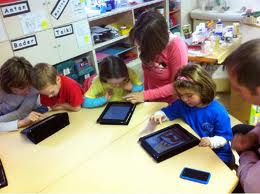
Reading
Subtext iPad app The list of the things that you can do with Subtext is quite impressive, but the basic purpose is to provide a place for teachers and students to have digital book discussion. video Using Subtext you can read ebooks, annotate ebooks, create quizzes about ebooks, and write blog posts about the ebooks you read. You can create private and public book discussion groups and build bookshelves for your groups. To add books to your Subtext bookshelves you can pull from Google Books (many free ebooks are available that way), buy ebooks from Subtext (volume pricing is available), or upload your own titles (directions here). To annotate a section of a book just highlight it then choose what you want to do with it. The text that you highlight can be annotated with your messages, you can assign a quiz question to that text, or label that section as a literary element like "personification" or "foreshadowing." Use for Lit Circles
Book Wizard Mobile is a Scholastic service that allows you to create and organize book lists according to reading levels and students’ interests. Book Wizard Mobile is a free iPad and iPhone app that you can use to scan a book’s barcode to quickly discover its lexile measurement, grade level equivalent, and guided reading level. Within the app you can create book lists and edit the existing book lists that you have created in your Scholastic.com teacher profile.
The NaturalReader text-to-speech(TTS) application converts PDF files, MS Word documents, and e-books into spoken words. You can have any text read to you in one of over 18 natural-sounding voices.(offline voices) It is also an efficient proofreading tool; it not only picks out mistakes in your work, but gives you a good sense of the natural flow of what you have written.Moreover, NaturalReader is a great help to students with dyslexia or other learning difficulties. By listening to text rather reading, students are better able to comprehend reading materials or detect spelling errors in their own work.
Finally, NaturalReader is a great tool with which to learn a foreign language. You can practice your comprehension and pronunciation skills by listening to any written words being spoken at your preferred speed.FluencyFinder - assesses student's reading fluency. This is a very simple app to use and get instant real-time results for assessing student's reading fluency.
I Play and Sing PreK - K interactive reading activities
International Children’s Digital Library (ICDL) is an iPad app that offers a plethora of free books specifically selected for kids and young learners. ICDL features a large collection of children’s books from over 60 countries and in different languages. The books are provided in highly readable format with beautiful illustrations and graphics. The purpose behind this project is to “to excite and inspire young readers to become better world citizens by leveraging technology to reach underserved children who have little access to libraries.
Cloudy with a Chance of Meatballs (free) allows children to read an interactive storybook by themselves, with help, or simply listen to it read aloud.
Goodnight Safari is a beautifully illustrated interactive book that children can explore independently.
The Dog and the Bone is an interactive storybook Children can tap on the screen to hear the words read aloud and play a game that asks them to sequence eventsfrom the story. This app also includes comprehension questions for students to check their understanding of what they have read.
iStoryBooks offers more than two dozen children's books for free. The service offers iOS, Android, and Windows 8 apps. Most of the stories in the app are adaptations of classic children's tales like The Ugly Duckling. The app gives you the option to read each story or to read along with each story while listening to the narrator.
Frotz- Interactive Fiction gr 4- 12 readers interact with the stories by thinking, writing and reflecting.
It can be used in a school environment to connect readers to partners in a neighboring school or to students in another time zone. Caribu comes with a couple free books and the rest are for a fee
Kindoma Storytime.
This partner-reading app connects two people through the wireless
internet connection on their tablet. Sharing a view of the same book,
users can watch the pages turn together, see each other's face, and hear
the voice of their friend all at the same time.
Shakespeare in Bits Visuals that correspond to the Shakesperean verse. The audio actors are spot on and the animations are great but the SOUND quality is a bit subpar especially on headphones. The notes and text are also well done.
Shakespeare the complete works of Shakespeare (41 plays, 154 sonnets and 6 poems, including doubtful works) and a searchable concordance to find the exact word or phrase you’re looking for
The Dreamhold is an interactive fiction story that is designed to introduce readers to the concept of exploring story via text only (No graphics. No animation. Only words and imagination).
Zalarios Adventure Books interactive ebooks. The adventure series filled with dastardly villains and impossible predicaments? Be immersed in the amazing world of the Zalairos, an extraordinary group of young friends who work together to solve mysteries.
Oxford Owl is a collection of free children’s ebooks for kids ages 3-11. Each ebook has accompanying audio so that students can choose to read along, or read independently. The books also have activities that focus on reading comprehension and story recall.
Goodnight Safari is a beautifully illustrated interactive book that children can explore independently.
Dino Store a twenty-three page story about a father and son going to the grocery store and accidentally coming home with dinosaur eggs that hatch at home. On each page of the story children can tap objects to make them change color, make sounds, move the dinosaurs, and discover other fun surprises.
Apps for Teaching Elementary Reading
Bookster offers a kid-friendly, easy to use interface that gets young readers learning. It is a read-along storytelling app that reads to your kids, records and plays their voices, and teaches vocabulary along the way. The downside is a limited range of stories available, but we found that the many features available outweighed the limited library.
Hideout features six interactive stories based on the sounds and words created with the letter combinations “ap,” “en,” “it,” “op,” “ag,” and “et.” The narrator reads the letters to the student, explains the sound, then challenges the student to create four words with the letter combination. After making four words students move onto an interactive story in which they identify the objects that match the words they just made.
Just 2 Words is a fun free app where students solve for a two word phrase that matches a set of pictures. With different degrees of challenges
Sentence Reading Magic This app provides the missing link between reading words and reading books-reading sentences. Most reading programs go from reading words to reading books, which is a big gap. This app helps to bridge that gap giving emerging readers a gradual and fun step up from reading words.
Storybots students become a character in the story
Collins Big Cat Interactive Books short story and part story creation tool. It contains a short story that students can read to themselves or have narrated to them. The story contains interactive elements that students can move around on each page of the stories. After reading and or listening to the story students can create their own stories using settings and characters that match the theme of the story they just read.
It Was a Cold, Dark Night | The Steam Train | Around the World | My Bike Ride | In The Garden | At the Dump | Playing Story The Farmer's Lunch
Penguin Leveled Reader Students can listen to narration, read along, and manipulate the story. This app comes with one free text from each of the four levels offered and more can be downloaded with in-app purchases.
Book Wizard is a Scholastic service that allows you to create and
organize book lists according to reading levels and students’ interests. Book Wizard Mobile is a free iPad, iPhone, and Android app
that you can use to scan a book’s barcode to quickly discover its lexile
measurement, grade level equivalent, and guided reading level. Within
the app you can create book lists and edit the existing book lists that
you have created in your Scholastic.com teacher profile.
Phonics Genius It allows customization
Little Minds This application has 6 carefully selected stories that use variation of fonts, styles, colors, pictures, situations, characters, and figures of speech to provide a uniquely intelligent and entertaining educational experience to early readers.
The Shoemaker and the Elves superb animation and interactive activities. Take your children on a magical journey and join the shoemaker and his wife as they receive lots of help from their friends the Elves and create the finest pairs of shoes ever made. Teach your children an important lesson that in giving they receive.
Flying Books find ebooks to read and create your own
Aesops's Quest is a learning game where kids have to remember the story read by an ant. to help the character on her quest $0.99
Aesop's Fables interactive book from the Library of Congress. The book is available to read on the Web, on an iPad, and on an Android device. The book contains more than 140 of Aesop's Fables for children. The level of interactivity varies widely depending upon which story you're reading.
MeeGenius ebooks for kids. MeeGenius allows users to turn narration on and off for each book. When narration is turned on each word in the story is highlighted as it's read.
Even Monsters Get Sick is a children’s story that is available in an interactive format for your child’s iPad.
Frotz play various interactive fiction adventure games. These are text based so you read literature in a fun, interactive way
Dr. Seuss Treasury app
gives you easy access to 50+ classic Dr. Seuss books in a single,
portable, digital library. Each book is a dynamic and interactive
reading experience, complete with custom narration and sound effects,
tappable words and pictures, and 3 reading modes that help even the
youngest of readers connect with each story.
Tell a Tale - a user verbally tells a story based on the first and last sentence of a story and three images.
ZooBurst for creating 3D digital popup books.
English Idioms Learn their derivation and some include animations
Bookster read-along storytelling app that reads to your kids, records and plays their voices, and teaches vocabulary along the way.
Digital Storytelling High quality interactive stories
Mooklet allows you to create a "Mooklet", a "Photo Story Book", using your photos and text, that is unique in the world!
Adobe Voice easy to create beautiful picture stories. Like other picture story apps, Adobe Voice allows you to record your voice, import pictures, and write text to create a short video. What makes Adobe Voice better than a lot of apps similar to it is the huge gallery of more than 25,000 images, icons, and music tracks that you can use if you don’t have media of your own to use in your story.
Book Builder This app acts like a Choose Your Own Adventure style book where a picture book is read and then the user gets to decide between two different paths to take. There are two story books to choose from w/ over 30 different endings and each story can be narrated as well. As the narration is read it also highlights the words to help students w/ their Reading skills.
Free eBooks: This collection includes many children’s classics in ebook format. You generally have the option to download these texts to your Kindle, iPad, Nook or computer. Video tutorials are included on the page. You may also want to visit our resource: Download 20 Popular High School Books Available as Free eBooks & Audio Books.
Storia is an ereader app for children's lit. When you download you get 5 free started books. You can create a classroom bookshelf or you can create individual bookshelves for all of your students. This would be great for reading differentiation and providing students with books at their instructional reading levels.
Bluster It is set up for independent and partner practice and prompts the player to choose between Practice skills like: rhyming words, prefixes and suffixes, synonyms, word roots, homophones, and adjectives
The Opposites learn pairs of words with the opposite meanings
Penguin Leveled Reader for young readers. Students can listen to narration, read along, and manipulate the story. This app comes with one free text from each of the four levels offered
Shout Science is an interactive book that tells stories behind science discoveries. Students can scroll through a timeline and read about famous scientists.

Writing
StoryBuddy 2 Lite StoryBuddy provides a magical platform to create, read and share multi-page stories
Easy Blog Jr designed so early childhood to elementary school students have an easy way to publish a online journal
Perfect Captions in your classroom. For example, use this app with primary source documents, but it’s also perfect for reinforcing literacy skills. Have students create captions to record their predictions, to jot questions that they have, or write dialogue for the main character.
StoryMe lets you design personalized comic strips from your own photos. Create beautiful framed collages with speech bubbles and captions – then apply a unique cartoon filter! Turn individual images into a story in seconds.
Make Belief Comix allows you to do pretty much the same thing you would do on its web-based platform. You can use it with your students to create and narrate stories using a wide variety of comic characters and many other tools.
Cookie Next Door is a sandbox to experience the creative play of story telling by being a co-creator and voice actor in an adventurous tale. The kit includes a creative comic book, voice over studio and animated stage projector.
- Creative Comic Book: Storyboards are perfect training wheels for imaginative minds to learn the story telling experience. Unlock pages, sound effects and other surprises as you create dialog, sound effects and narrate each frame.
- Voice Over Studio: Tell the tale. Become the narrator and voice actor of the unfolding drama. Record your voice and hear your speech magically transformed into a cast members of the tale.
- Animated Stage Projector: Once you complete your story, experience it as a play projected on moving screens with dancing props to highlight the action.
• Fictional person, Real person, Fictional place, Real place, Object, Event, Vocabulary word
PhotoCard Create unique custom-designed postcards
Plotagon is an app making stories come to life, with you in the director’s seat. Write your story, choose the characters, and press play – it's that simple.
Imagistory is a creative storytelling app which uses wordless picture books. The idea behind the wordless books is that kids get to be the storytellers, simply by using their imaginations to tell the story using the pictures, creating it as they go. It's a new way for kids and parents/teachers to share a story together, ones which can be told a different way every time. It's also a great tool for engaging the imagination and helping to foster creativity and language skills.
TeleStory takes you behind the scenes to create and broadcast your own TV show! Record a music video, teleport to an alien planet, film a high-speed-chase, or perform on a reality TV show - TeleStory is a TV studio in your pocket.
Cloudart (.99) app for creating word clouds. This is a very easy to use app where a user can either add the text they want in their clouds or transform text from a webpage into a cloud. Also, a user can edit their cloud once it is created to emphasize on certain words.
Word Clouds by ABCya just type or paste text into the text field. After entering your text Word Clouds by ABCya will generate a visual representation of the most common words in your passage of text. You can customize the generated word cloud by choosing different fonts, different color schemes, and by excluding words from the word cloud. Your word clouds can be saved directly to your iPad’s camera roll.
Wowed “Create beautiful word clouds on your iPhone from tweets, webpages, and
more. Choose from a range of different fonts, colors, and layouts to
customise the appearance of the clouds that you create.”
Wordsalad Make great wordsalads out of documents that matter (or not) to you! With WordSalad you can make beautiful word clouds, super customized with different fonts, colors and words layouts.
Word Mover from Read Write Think. The app is designed to help students develop poems and short stories. When students open the Word Mover app they are shown a selection of words that they can drag onto a canvas to construct a poem or story. Word Mover provides students with eight canvas backgrounds on which they can construct their poems. If the word bank provided by Word Mover doesn’t offer enough words they can add their own words to the word bank.
Visual Poet: Visual Poet is an application for creating visual poetry. With Visual Poet, the user can combine imagery and text to author compelling mixed media works of art and publish them to the internet. Create 3 panel visual poems using Google images or from your own photo library and then email your work.
Poetry CreatorAfter creating a poem out of your own personal mix of dictionaries, you can send your creation to friends via email. Arranging words into your own poetry is much easier and smoother (and thus more enjoyable) using Verses.
Tranquillity - And if you are writing a simple poem, this free web app suggests rhymes, counts syllables, and gives you a clutter-free place to work.
Visual Poetry create custom word clouds. The app’s name implies that it only works for poetry, but it will work with any text that you write. Visual Poetry allows you to choose from a menu of word cloud shapes. If the shapes in the menu aren’t quite what you’re after, you can draw your own shapes to use for your word clouds. By default Visual Poetry makes the most common words the largest, but you can make other words the featured words by simply typing them into your word clouds.
Tell About This for responding or creating a writing prompt. A teacher can use it as a writing prompt for students to tell a story. Best of all, a student can use the app to record their response right into the app. Also, a student/teacher can use it to create their own prompt or even use it for digital storytelling.
Storehouse is an iPad app for visual storytelling with your pictures and video clips. The basic idea behind Storehouse is to create stories by combining images, text, and video clips on a blank canvas. To create your stories you can import pictures and video from your iPad’s camera roll, from Instagram, from Dropbox, and from Flickr. You can arrange the sequence of the media by dragging and dropping it into place. You can add text above and below each picture or video clip in your story.
Imagistory This is a "wordless" picture book where students can record their own narration of the story that they select. As they open the book, the story begins to record through the iPad's microphone. Once a story is finished it can then be saved and played back or record a new version of your story. This is a great app for the younger kids to introduce them to digital storytelling and get their creative juices flowing.
Jumbled Sentences series of free iPad apps comes the I Can Write series. I Can Write is a series of free iPad apps in which students are shown a picture that they have to complete by dragging objects into place. After dragging an object into place students write a sentence about the object in the scene. If the sentence is written correctly, the student will hear it read aloud. If the sentence is written incorrectly then the student will not hear it read aloud and will have to try again.
Storehouse for creating, sharing, and discovering new stories. Students can use this app to create beautiful stories to share with others. Storehouse allows them to combine photos, videos and text to design their stories. They can easily add photos and videos from their iPad Camera Roll, Dropbox, Flickr, and Instagram. v ideo overview
PicView is a free iPad app that makes it easy to create simple photo stories. PicView allows you to create an audio recording about a picture. Your images can be enhanced with some simple color filters, border designs, a title, and markers. Your completed PicView story can be shared via email, posted on the PicView site, shared on Facebook, or shared on Twitter.
i Tell a Story Choose a picture from your photo album, tell a short story about it, add music from your library and sound effects from the small library in the app. Save the story to be played on your iPad, or email it as an .m4a audio file that can be opened with apps like iTunes or Windows Media Player.
Little Story Maker Add pictures, text and audio to create a story. Three playback modes - read to me, read by myself, and auto-play which automatically turns from page to page.
Infinite Canvas Built around the concept of an expandable story map with an interactive part that allows you to create a project with multiple paths, and let the viewer/reader/player make decisions that brings you along various paths of a story. video
Bill Atkinson PhotoCard Postcard create custom-designed postcards including text
Tell a Tale For partner and group work, this app gives the first and last sentence of a story and three images that must be referenced somewhere in their tale. Players have to create their own story using only these clues!
Word Mover gr 3 - 12 allows children and teens to create “found poetry” by
choosing from word banks and existing famous works; additionally, users
can add new words to create a piece of poetry by moving/manipulating
the text.
Haiku Poem App gr 3 -12 Students can learn about and write haiku using this app that guides them through the writing process.
Theme Poems is another terrific app available for iPads and Android
tablets from the International Reading Association. Elementary school
students can choose from a variety of themes and create a poem that
takes
Adobe Voice. This free iPad app is very user friendly and makes the storytelling process simple for children young and old. Kids can add pictures, text, and even choose from different icons to bring their stories to life. Adobe Voice has an easy recording feature for students to add their voice as narration. There is a music library and a selection of themes for users to pick out and include in their final product.
Demibooks is the first iPad-based authoring software for creating interactive books. If you’re an author, illustrator, designer or publisher, and you’ve got a story to tell – then this app is for you! Versatile and incredibly easy-to-use. Create your own book apps with realistic physics, animation, sounds and visual effects. Share your stories with your friends via Composer or use our PrintShop web service to publish your book app back to the App Store!
A Novel Idea (gr 4- 12) Plot your story and record bursts of inspiration. Create characters, locations, scenes and novels and link them together. Arrange scenes by dragging and dropping.
Narratavius play interactive fiction stories, also known as text adventures. Where Narratavius differs, though, is that it was designed from the ground up to run on iOS. Instead of typing commands into an on-screen keyboard, you will simply tap to make decisions.
Pocket Mobile Resume app Have students use the app to demonstrate their knowledge of a historical figure’s personal information, experience and education, while choosing contemporaries to act as references and identify the skills and strengths of this person.
Bubble And Pebble Story- help these characters undergo adventures. Kids can then create their own Bubble and Pebble drawings of a new adventure then share these stories and drawings with their peers.
AutoRap will take your words and turn them into a rap
Sock Puppets lets you create your own lip-synched videos and share them on Facebook and YouTube. Add Puppets, props, scenery, and backgrounds and start creating. Hit the record button and the puppets automatically lip-synch to your voice.
Comic Puppets Create comic strips with the option to switch people faces for the cartoon characters.
Strip Designer 2.99 create comic strips with photos on your iPad
Comic Book 1.99 create comic books with nice options like panels, special effects, sticker artwork. support page
Comic Life - 4.99 Probably the most popular digital comic iOS app for creating comics. This is a very fun and easy to use app for telling the story by creating a customized comic.
- Our Story This app lets young learners take part in fun games that can help them develop their reading skills.
Word Mover from Read Write Think. The app is designed to help students develop poems and short stories. When students open the Word Mover app they are shown a selection of words that they can drag onto a canvas to construct a poem or story. Word Mover provides students with eight canvas backgrounds on which they can construct their poems. If the word bank provided by Word Mover doesn’t offer enough words they can add their own words to the word bank.
Doodlecast for Kids (2.99) allows students to create short whiteboard videos. Students can create short videos by drawing on a blank whiteboard. Students can record their voices as they draw on the whiteboard. Students who are struggling to start their stories can use one of the twenty-three story prompts
123D Creature Using 123D Creature students can draw three dimensional model creatures on their iPads. The creatures start with a basic skeleton and the app users take it from there. Models can have many limbs, colors, positions, and special effects added to them. When the model is complete it can be saved and or printed. If your students are writing short, science fiction stories they could use 123D Creature to create some models to use in their stories. This app does require iOS 6.0 or later.
Journal Jar – students simply shake this app to get a writing prompt. Give them about 5 to 10 minutes to come up with stories based on this prompt.
StoryKit App- students can create detailed books about their lives, what they imagine, or change the ending of a classic story. This app allows students to take old classic books like the 3 Little Pigs and edit the pages. Students can even tell the story from a different point-of-view.
Kid's Journal (1.99) Children can record their feelings, location (i.e. home, school, on vacation), or the weather. Kid’s Journal entries have the option to post a photo and include room for text to add more details about the day.Shadow Puppet EDU the excellent free mobile iOS app for creating digital stories/videos has just released their biggest update. Version 2.0 allows users to upload video, search the web for animated gifs/images, add music from your iTunes library, and even draw on the screen for annotating. This is a very easy tool to use and allows educators/students to "flip" a lesson, cover a topic, or introduce digital storytelling. Also, Shadow Puppet has updated their site which has lots of different lesson plans, samples, and examples of how teachers are integrating SP into their classroom.
Posterous- have students create poems or audio stories.
Shmuppet – students create a podcast or tell a short story with a puppet and send them to their friends via email, Facebook, or Twitter.
Bunsella Bedtimes Story- students narrate a children’s story and send to a children’s class in the local elementary or a younger brother or sister or for children in another country. They children then can respond to these read stories.StoryBots- create books on the iPad starring the student! The app is free for the iPad. Includes animations and art. Various options to purchase the book.
Flying Books App- Multimedia books offered in English, French, Spanish and German. Kids listen to an expert narrator or read on their own. Record a story or create personalized books with artwork and photos.
Storypanda- Features books with tap, swipe, and drag. Choose backgrounds and characters, etc. Kids can place themselves into the story or create their own stories.
30hands - A fantastic user-friendly app for creating a story by adding a narrations to photos. Also has an excellent video tutorial to help users create a story.
Studio Pango pre-K - 2)produces a bunch of iPad apps . Some of the apps are free and some of the apps require purchase. To get a sense of what the paid apps offer, try the free apps first. Free: Pango Book 1 and Pango Playground for Kids.

Animation
Animation Creator HD Lite For IPad- students can create their own animations for a story. They can use this app to create the characters for a story and even add audio. Have them create dialogues, flesh out characters, or create graphic novel type stories with the animations they create.
Puppet Pals Create your own unique shows with animation and audio in real time!free iBook activities
Talking Tom or Talking Ben create an animated video with audio. both apps allow the user to interact with the animal. The animal will repeat what you say.

Audio
TagPad for conducting and managing audio and text from interviews.
Audio Memos creating and sharing audio messages. The app is available in three versions. The free version is limited to 3MB recordings, the $0.99 version is limited to 15MB recordings, and the "pro" $9.99 version has a nice selection of audio editing tools built-in.
Audioboo- create a simple podcast, e.g., local news around the school
Dictating has never been easier! Voice Texting Pro doesn't need to learn your voice, no training is required. It works straight out of the box. By default, it uses the language appropriate to the settings of your device. So if you are in Spain, it recognizes Spanish, etc. You can change the language in the settings page.
SPOKEnPHOTO Album - And if a book isn't enough, take a photo, add your voice, and get a spoken photo album.
Bluster It is set up for independent and partner practice and prompts the player to choose between Practice skills like: rhyming words, prefixes and suffixes, synonyms, word roots, homophones, and adjectives

Social Studies Apps
General History and Social Studies
HistoryPin
Based on the HistoryPin online tool, their mobile app is a way for people to come together, from across different generations, cultures and places, to share small glimpses of the past and to build up the huge story of human history. It lets you discover windows into the past by seeing and interacting with the history all around you.
The Trading Card Creator offered by Read Write Think. The Trading Card Creator allows students to create trading cards about people, places, and events both real and fictional. It is available as a browser-based tool, as an iPad app, and as an Android app.
Sphere designed to help you explore the world through your iPad. With Sphere installed on your iPad, you can experience immersive 360 degree panoramic imagery. Open the app, pick a location and zoom to it to view the panoramas. Move your iPad to explore the panoramas. Sphere could be a great iPad app for your students to use for virtual field trips. On the Sphere blog there is a good list of examples of teachers using Sphere in this manner for lessons in geography, language arts, and science.
Historia ideal for bringing History into the classroom through Game Based Learning. This game has students team up in groups to lead a civilization into prosperity by doing project based research and making important decisions that impact how their civilization will grow. Also, this game is designed for all kinds of devices such as: interactive whiteboards, tablets, and desktops (Mac/PC), and is aligned to Common Core Standards.
AutoRap - Music can be a great memorization tool. What if your students could turn their assignments into rap songs? With this mobile app, they can!
The Right to Food is an interactive story about the challenges of feeding the world's people. The story, produced by feedingminds.org, takes students to eight locations around the world. At each location students read about how people get food and the challenges that people can face in getting adequate food for themselves and their families.
The Wider Image is a beautiful free iPad app from Reuters. The app features slideshows of news stories and cultural events around the world. Open the app and browse through the thumbnails until you find a story that grabs your attention.
Smithsonian Channel for iPad watch educational videos without having to go to YouTube. You can browse and search for full-length educational videos as well as shorter clips produced by Smithsonian. The app allows you to create your own thematic channels or collections of educational videos. The channel creation interface uses a webbed format. When you drag a topic into your channel, the app creates a visual web of videos related to your chosen topic.
Library of Congress--Virtual Tour provides images of the Library's historic rooms along with historical information about them. The images are also paired with related links for further investigation. Audio podcasts about items and features in each room can be accessed through the LOC Virtual Tour app.
DocsTeach is an online tool for teaching with documents from the National Archives. On the web site, you will discover thousands of primary sources and learning activities. When registered for a free account, teachers can borrow from and modify an ever-expanding collection of activities, plus create unique ones using the online tools. The problem is the online version is Flash-based, making it impossible to use on iPads. This mobile app makes it possible to access much of the content. Log in to the website, create classrooms full of activities, then share the classroom’s auto generated code with your students to access on their iPads.
Perfect Captions in your classroom. For example, use this app with primary source documents, but it’s also perfect for reinforcing literacy skills. Have students create captions to record their predictions, to jot questions that they have, or write dialogue for the main character.
SnagFilms Completely free, with no requirement to sign up, SnagFilms offers a great variety of award winning documentaries.
Woices.com Location Based Audioguides- students can create tours about various locations around the city. Have them research the history behind a place and tell the story behind that place for others to listen to when they visit.
Tour Wrist Creating tours is just as fun and easy too! Use your iPhone, iPad or iPod Touch to shoot and share for free. Or check out TourWrist.com to learn more about the professional options available.
Pocket Mobile Resume app Have students use the app to demonstrate their knowledge of a historical figure’s personal information, experience and education, while choosing contemporaries to act as references and identify the skills and strengths of this person.
Read Write Think Trading Cards allows students to create trading cards about people, places, and events both real and fictional
Google Earth
TinyTap (K-4) allows you to create simple games based on pictures that you take. The purpose of the games you build is to help young students practice identifying objects and patterns. A brand new update to TinyTap now gives users the ability to add video to their activities.
Discovery Channel Clips of new shows that can hook your students
US History
The Library of Congress (LOC) has released a set of free ebooks for iPad users. The Student Discovery series brings together historical artifacts and one-of-a-kind documents on a wide range of topics, from history to science to literature. Interactive tools let students zoom in, draw to highlight details and conduct open-ended primary source analysis. The series covers the United States Constitution, the Dust Bowl, the Harlem Renaissance, immigration, symbols of the United States and the cosmos. The ebooks are available to download with iBooks on a Mac or iPad and with iTunes on a computer. A Teacher’s Guide with background information, teaching ideas and additional resources is available on the LOC web page for teachers. Click Here to Access Free Downloadable eBooks
Early Jamestown an interactive textbook exploration of the early days of the Jamestown settlement and the state of Virginia. Enjoy the rich interactive graphics and the engrossing story of a key moment in the history of the United States.
American Revolution Interactive Timeline app let’s you travel through this period looking at artifacts and documents that tell the story of the Revolutionary War. Students can tap and explore primary sources while swiping through the years of the American Revolution.
History Here An interactive guide to thousands of historic locations across the United States, brought to you by the HISTORY CHANNEL. The easy-to-use interface, photos, video and dynamic maps bring history to life anywhere in the country. , includes amazing architecture, museums, battlefields, monuments, famous homes and much more!
- Watch full episodes and clips of your favorite HISTORY series including Pawn Stars, Vikings, American Pickers, Swamp People and many more.
- Create a customized Watchlist of your favorite shows.
- See exclusive clips from HISTORY shows, never before shown on television.
- Explore the Topics section for a selection of clips about the most fascinating categories of history
Think fast About the Past contains two “missions” for students to complete. The first mission is set in Boston in 1770. The mission is to find the mission dog named thimble before time expires. To find Thimble students have to correctly answer a series of questions about political and social topics of the 1770′s and 1780′s. For example, one question asks students how women supported the American Revolution. The second mission in Think Fast About the Past is set in Kentucky in 1850. In this mission students have to answer a series of questions about slavery, abolition, and the Civil War. The object is to answer all of the questions correctly in five minutes or less.
Underground Railroad: Journey to Freedom is a great choice for upper elementary and middle school students. This interactive app introduces children to the Underground Railroad by placing them in first person experiences. They’ll have to make decisions on how to proceed from on step to the next while they learn about this period in history.
primary source documents. The Library of Congress has an excellent new app to help students learn about primary sources with video clips, quizzes and a gallery to explore, the Congressional Moments app will support American History teachers as they gather resources for their classroom.
To Be Free is one of the free Smithsonian iPad apps.To Be Free features the stories of former slaves and others affected by the Emancipation Proclamation. You can scroll through slideshows and read personal accounts from people of all ages, status, and location in the United States at the time of the Emancipation Proclamation.

Oregon Trail (0.99) is an iPad version of the classic game. Players move westward by overcoming obstacles like river crossings, wagon break-downs, and illnesses. To keep the journey going you need to manage your food and other supplies.
Oregon Trail American Settler (free) picks up where Oregon Trail leaves off. In Oregon Trail American Settler you have already reached the frontier and now you need to build your settlement from scratch. As you build your settlement you need to consider which types of buildings you want to build, where to place buildings, and where to play farm plots. Of course, in order to keep yourself and your family alive you still have to deal with illnesses and other surprises.
Manifest Destiny allows students to explore the motivations of pioneers, the struggles they faced and terrain they explored. Introduces students to Westward Expansion through the famous painting by John Gast as a primary resource
Changing America To Be Free It includes images related to the Civil War and quotes written by people who lived through the period.Covers the Emancipation to the March on Washington, 1963
Civil War KIDS DISCOVER (3.99) is about the U.S. Civil War. The content of the app is far superior to the Civil War section of any middle school or elementary school social studies textbooks that I’ve seen. In the app students can read text, listen to audio of things like the Gettysburg Address, and manipulate 3-D objects. The app also includes videos, cartoons, and plenty of historical imagery. Students can tap the images to learn more about the people and places pictured.
Maps and Geography
MapLets
Maplets is the perfect compliment to Google Maps: You can download and store maps of national parks, state parks, metro, subway, bike maps, ski resorts, college campuses, zoos, theme parks and more! Works on both iPad, iPhone, and iPod. Perfect for field trips, perfecting map skills, learning more about regions, human geography, etc.
StrataLogica i The app provides a satellite view and a map view of a 3D globe. Students can manipulate the globe to zoom-in, zoom-out, and spin the world. Those are all things that can be done with Google Earth for iPad too. It’s after that that StrataLogica starts to shine.
StrataLogica provides basic layers of information about each country on the globe. Students simply tap the country to view a pop-up window of facts. Students and teachers can create custom placemarkers through StrataLogica. The placemarkers can include text, pictures, and videos.
National Geographic Today:Indulge in bite-sized, nourishing daily doses of geography videos, photos, and more through the globe-trotting juggernaut.
US Geography by Discovery
Discovery Education’s U.S. Geography app for iPhone and iPod Touch is the perfect way to become an expert in U.S. Geography while being entertained for hours on end. With dozens of breathtaking videos, interactive gameplay, global competition and sharing — there’s never been a more exciting and engaging way to experience U.S. Geography!
Stack the States in a must have app that’s fantastic for geography practice at any age. Students answer multiple choice questions and have visuals of each state as they choose their answer.
Stack the Countries for world geography questions.
TapQuiz Map a game that tests your knowledge of the globe. The player can focus on one region of the world at a time and see what countries and US states they can locate on a map.
ArcGIS Maps come to life in ArcGIS. Tap the map, or use your current location and discover information about what you see. You can query the map, search and find interesting information, measure distances and areas of interest, and share maps with others. Find community hosted maps from ArcGIS Online - Esri's online GIS. Alternatively, you can use the authoring tools on ArcGIS.com to create maps that can be used in ArcGIS.
Atlas for iPad
World Travel Atlas
3D Atlas by Collins. Zoom in to their satellite view of the Earth and access more information about countries, cities and states. The satellite globe comes free with the app and more detailed maps can be purchased within the app.
My World Atlas
History: Maps of World Wide variety of historical displays (high resolution maps) and support for category/era view. Other history maps available - U.S., Europe, Americas, Africa, Middle East, etc.
ArcGIS is a great way to discover and use maps. Tap on the map or use your current location and discover information about what you see. You can query the map, search and find interesting information, measure distances and areas of interest, find community hosted maps, create your own maps, and share them with others.
Barefoot World Atlas a interactive 3D globe that invites children to explore the regions and countries of the world, discovering hundreds of fascinating features and immersing themselves in the rich wonders of our planet. This is a multi-language, universal app. The rich and beautifully detailed graphics take full advantage of the amazing new high definition retina screen.
Discovery and Exploration Maps This app is a rich illustrated collection highlighting how great explorers increases our knowledge about their lives and discoveries. The oldest map dates back to 84 CE and the most recent from 1854. There are some amazing old drawings and details.
Current Events
Snackr an iPhone and iPad app that allows you to listen to a set of customized news channels. Snackr's goal is to provide you with headlines and summaries of news that is most important to you and your students. video demo
News-O-Matic, Daily Reading for Kids gr. 3-5 provides images, videos and maps to accompany five daily news stories. An interactive map with quirky facts, puzzles, games and the NewsRoom are all features that engage students in current events.
Watchup. This free app allows you to create your own news program by choosing short clips from different news sources (EuroNews, AP, PBS, etc.).
News-o-matic (K- 6) publishes five new passages for students to read each day. News-O-Matic is bilingual and offers each of their daily articles in English and Spanish. Students can switch back and forth and hear both texts read aloud. There are assessment questions that give teachers an understanding of well a student was able to comprehend what they read. These questions can be customized and are aligned to the Common Core. Each article can be tailored to multiple reading levels making it easy to differentiate instruction.
Talking Tom & Ben News Reporters- students create dialogues that reflect any news item worldwide and around the school. Kids will love when Tom and Ben report that news.
Newseum Front pages of newspapers from around the world.
NBC Nightly News has an app that features up to the minute video clips on events of the day.
World History and Cultures
European Exploration: The Age of Discovery Explore the new world as a European power in the 15th Century by funding and sending expeditions out into the unknown. Hire captains, build ships and outfit voyages to learn of the wonders of the new world.
Become the Pharaoh’s architect, build historic temples, manage your resources skilfully and avoid enemies to succeed! Great Pharaoh Touti and his friends are back for an epic adventure that will take you on a journey along the Nile in TimeBuilders: Pyramid Rising 2.
Mayan Mysteries (0.99) gr 5-9 Engages students in archeology, Students solve a variety of puzzles to gather clues that lead them to a secretive thief.
- Watch full episodes and clips of your favorite HISTORY series including Pawn Stars, Vikings, American Pickers, Swamp People and many more.
- Create a customized Watchlist of your favorite shows.
- See exclusive clips from HISTORY shows, never before shown on television.
- Explore the Topics section for a selection of clips about the most fascinating categories of history
Government/Civics
Pocket Law Firm Vindicate the Constitution! Decide if potential clients have a right, match them with the right lawyer, and win the case. The more clients you serve and the more cases you win, the faster your law firm grows! This is the most popular game ever made by Justice Sandra Day O’Connor’s iCivics program.
My Congress a portal to detailed information about your elected U.S. Congressional officials. Track their news, video and Twitter feeds. Look up their official Open Congress profile or contact them directly. MyCongress helps you get in touch with your government.
The Wilson Center‘s app. It contains articles on a wide range of global issues including education, human rights, and technology. If your high school students are doing research on a current events topic or you’re just looking to dig into a news story, you’ll find lots of great articles.
Stats of the Union This is a way to visualize and compare demographic data from across the U.S. Examine and compare birth/death rates, incomes, and more.
Geography
Flat Stanley Browse countries
NASA’s Earth Now allows users to spin the earth with different filters. Check out daily temperatures, ozone, sea level and more!
Logic
Charge Your Brain By Unusual Things BRAIN GAMES Grades K-2 Grades 3-5 “ a combination of mini-games that will allow you to develop various sections of your brain in a relaxing and funny way. Each mini-game involves different directions of mental activity: image recognition, speed of response, logic, comparison of objects, searching and mathematic skills, memory, etc.
Amazing Alex - A game from the creators of Angry Birds that focuses on the concept of Rube Goldberg MachinesPoptropica is a free iPad app based on the popular online game by Jeff Kinney (author of the Diary of a Wimpy Kid series). This is a super fun adventure game that has kids solving puzzles and using logical thinking to complete quests on two different islands. Best of all, it is completely safe, saves user data, and has high replay value. It's a nice way for kids to play a educational type game w/out playing one of those mindless shooting/fighting style games that are so popular.
Unravel Me The main goal is to untie all the lines (make green) by dragging points. If the all lines are untied, the level will be completed.
Memorado has games for learners of all ages, Logic puzzles and brain games are a tool for supporting critical thinking skills. They ask students to think on their feet, pay attention to details, and make decisions based on logic and reasoning.
Brainbean is a colorful, kid-friendly game that will boost your students’ critical thinking and problem solving skills.
Kiko's Thinking Time is a fun free iOS app for
kids 3-7 yrs old developing their cognitive skills. This app focuses
on lots of different areas such as: memory, spatial, reasoning, and more
through educational activities. Kids will have fun and learn as they
unlock boards and rewards as they play through a wide variety of games.
Best of all, is the detailed reporting features that a parent/teacher
can even have emailed to them, that breaks down a student's progress.
Imagination Playground 3D Builder,
children can build, stack, channel and connect blue building blocks.
Build endlessly in the Quick Builder mode, and then flip on the Gravity
button to watch your blocks take on physical properties. Imagination
Playground 3D Builder encourages open ended, unstructured free play.
The benefits of this kind of play include creativity, self-expression,
communication, collaboration, problem solving, motor-skills
development.

App Collection for Special Needs Students called PowerUp help students with special needs and learning disabilities. I think one of the possibilities of touchscreen and multimedia devices is that it can make a wider array of content more available to a wider range of students. CommonSense Media does a nice job of annotating the apps in this free list (which is also downloadable as a PDF) and putting them into various categories, and then sorted by difficulty/age levels.
Apps for Kids with Special Needs Categories include educational, speech and language, communication, scheduling, games and more. You can also subscribe to a weekly digest of what's new.
Free Speech app is designed to assist students who have Autism and other speech and communication impairments. It provides a set of images and icons representing common household objects and activities. You can add more categories beyond the default and icons to the app by taking pictures with your iPad and labeling them. You can also add more categories and icons to the app by uploading them from albums on your iPad. The first time that you use the Free Speech app it asks you to fill in a bunch of information. I was able to use the app by only entering my name and email address making those other questions optional.
Phonics Studio glowing reviews from speech-language pathologists. The app provides flashcards to practice pronouncing more than 200 sounds. Each sound has a collection of flashcards. To practice pronunciation students can listen to a recording and then create their own recordings (open the preferences panel to turn on the built-in recordings).
Apps for Students with Dyslexia
Dyslexia Toolbox This app “by dyslexic people for dyslexic people” has a suite of useful assistive technology features for older kids with dyslexia. One feature is a type pad with word prediction software that can help kids create messages for text, email and social media. Another is a digital overlay for reading text through a color screen. There’s also a digital document reader (for purchase) that takes photos of text and reads them aloud.
Tell About This is an easy platform to inspire and capture children's thoughts and stories! They will love to explore and respond to any of the 100 interesting photo prompts using their voice. Craft custom prompts and add profiles to personalize the experience! Simple save/share options.
What Rhymes?: Encourage reading comprehension with this reading comprehension tool for visual and auditory learners.
Talkulator: Talkulator can help students with visual problems count and do arithmetic.
Go Go Games is a set of iPad games designed to help children that have Autism Spectrum Disorders practice recognizing the features and patterns of objects. While these games were designed for students with Autism Spectrum Disorders any young child would enjoy them.
Speech Journal ideal for either digital storytelling or Special Ed. Allows users to add photos into a nice looking slideshow as well as record their voice to add to each image. It's a very a simple tool and can be used by any age group.
Autism Speaks Listing of apps
Apps for Autistic Students Apps based on common characteristics and traits that are typical of ASD
Brain Parade’s See. Touch. Learn. is a free visual learning iPad app designed by a certified assistant behavior analyst specifically for those with autism and other special needs. This free app includes a starter set of high-quality images and 60 exercises. Additional libraries with more than 4,400 images and 2,000 exercises are available for purchase from within the app. Now you can access the Brain
Parade Communitywith thousands of lessons shared by others. Click Here to Visit iTunes App Store Plus: A Site Edition is available for private implementation in classroom, school and district settings. The package provides training sessions to educators and enables them to share custom content with teaching aides, therapists and parents in their private school communities.Click Here to Visit Website
See.Touch.Learn. - Built specifically for special needs education, your kids could benefit from this iPad app's easy-to-understand photographic flashcards.
Includes a starter set of stunning, high-quality images and 60 exercises created by a certified assistant behavior analyst! Additional libraries with over 4,400 additional images and lessons are available for purchase from within the app. Now you can access the Brain Parade® Community with thousands of lessons shared by others.
Kindergarten.com has nineteen excellent ABA (Applied Behavior Analysis) flashcard apps that are worth exploring too.
iPad for All is designed to share resources with educators, occupational, physical and speech therapists, special needs students, and persons with disabilities iPad for All shares apps, user tips, accessibility features, accessories, and helpful resources.
Dragon Dictation voice recognition application that allows you to easily speak and instantly see your text or email messages.
Voice Text Pro: FREE
Dictating
has never been easier! Voice Texting Pro doesn't need to learn your
voice, no training is required. It works straight out of the box. By
default, it uses the language appropriate to the settings of your
device. So if you are in Spain, it recognizes Spanish, etc. You can
change the language in the settings page.
Foldify 3.99 is an iPad app that students can use to design all kinds of 3D figures on their iPads. After designing their figures students can print their designs with directions for folding their designs into 3D paper objects. Foldify provides basic templates for objects like cars, houses, and people. Students complete the templates by coloring them in, adding their own pictures to the templates, and adding fun digital stamps to the templates.
Draw Your Stories It helps with visualizing the information which is a very important piece for comprehension skills It can be used for a variety of children including special educations students who have language learning deficits, reading comprehension deficits, and specific learning disability due to language weaknesses. Promotes language through motor skills modality It helps with active participation skills Promotes internal motivation to keep listening and interacting in the task
Speech Journal by Mobile Education Store creates books that allow you to pair recorded voices with an image. Don’t let the name fool you, it’s not just for speech therapists. You or your student can create social stories,
Speech Therapy for Apraxia -Words (4.99) is a convenient, effective speech therapy iPad app for children with Childhood Apraxia of Speech/dyspraxia, adults with apraxia, use by anyone working with individuals with apraxia, either therapists or parents. It can also be used for traditional articulation practice.
Talk n Photos add text and voice recording to album covers as well as each entry (picture) within an album
Little Writer is great for students with occupational therapy needs! It has options for tracing uppercase letters, lowercase letters, numbers, shapes, and words. Great for practice on formation and sizing!
Number Line for iPad (also available as a web app) is a powerful virtual tool that helps children see relationships between numbers and interact with a number line.
Todo K-2 Math Practice Designed with learning differences in mind (including kids with special needs), Todooffers Common Core-aligned math activities for a range of learners in preK-2 grade levels. The lack of student accounts and dashboard make this app useful for independent learning.
- iTalk Recorder a full-featured recording app with a streamlined and intuitive user interface.
Audio Note $4.99 ipad app recording and annotating notes. Can also use text and share notes with others
Talking Tom or Talking Ben create an animated video with audeio. both apps allow the user to interact with the animal. The animal will repeat what you say.
Assessment Apps If you work with students, especially special-needs students, part of the process is documenting goals that are measurable. We now have apps that can assist us with tracking students' progress.
Speech Therapy for Apraxia for helping children/adults w/ speech problems such as Apraxia. To be used w/ Parents and Speech Therapist to help children develop their speech. This is done by selecting different word groups and patterns and listening to the words and sounding them out. As a user proceeds they progress through 9 different levels motor/speech articulation or they can choose what level they want to work. Progress tracking w/ detailed instructions on how best to use this app.

Manage Class and School Apps
Meraki (free) lets you centrally manage mobile devices, macs and PC’s from the cloud based dashboard. The systems manager makes it simple to centrally manage applications. It integrates with Google Play, Amazon Appstore, Apple App Store and Apple’s Volume Purchase Program. In addition to being able to manage apps, Meraki makes it easy to enforce and deploy restrictions on mobile devices. Choose how your students access the app store, gaming and content, how they connect wirelessly, security settings and remote VPN access. Meraki has a virtual backpack where content can be shared with devices. Files and documents can be added and sent wirelessly. Separate backpacks can be delivered to different classrooms so that the correct documents are shared with the students who need it. The cloud platform makes 1 to 1 projects and BYOD (bring your own device) roll outs manageable.
Image Transfer One of the biggest logistical challenges in any classroom using iPads is figuring out the best workflow for managing devices. One app for moving camera roll photos from one device to another is Image Transfer.
With this app you can send any photos on your iPad to your computer
via a web browser. This means that instead of connecting your iPad to a
laptop with a cord you can transfer images wirelessly. This also works with iPhones and can be set up to push images on your computer to one of your iOS devices.
Showbie Instead of collecting and handing back paper assignments or trying to keep track of student assignments in an email account, teachers can use Showbie. For each class teachers set up, they receive a code to give students. That code connects students with their teacher and allows them to submit assignments and receive feedback. Teachers can have students submit traditional word-processing or slideshow presentation files, or allow them to use one of the many apps that work in conjunction with Showbie. As soon as students submit work, it appears in the teacher's account; teachers can then write or type comments directly on the work or record voice comments.
Skaffl allows teachers to plan, teach and grade using a collaborative iPad workflow solution. It also allows teachers to seamlessly distribute and collect assignments from students. Some other important features of Skaffl include :
For teachers:
- Create activities for students to complete
- Collect student work
- Annotate and grade student assignments
- Calendar View: Now you can view all your assignments in a easy to use calendar view that indicates distribution date and due date.
- Mini Previews: View previews of student work even before they turn it in!
For students:
- Get their assignments and keep track of due dates
- Hand in their assignments from other apps
- Annotate and complete written assignments
- All Incomplete Assignments Stream: Students now see a list of all incomplete assignments at the bottom of their “All Classes” screen. Now they can’t say they didn’t see it was due!
- Calendar View: Students see assignments on the day they were distributed, and they see a indicator of the assignment on the day it’s due.
10 Good iPad Apps for Wireless Printing
eBackpack assign, collect, review, annotate and return student work
Seesaw empowers students to document and share what they are learning in class.Students (as young as 5!) can independently create, capture, and store artifacts of learning in their private learning journal.Parents (after teacher approval) get notified of new items, giving them a glimpse of their child’s day and an opportunity to support learning at home.”
Unique method for accessing student work on iPads
Instashare – handy iOS device workflow solution to share files | overview
With School 4 One teachers can address all aspects of the iPad workflow. It makes leveraging all of the great features an iPad offers students easier for teachers. One of my favorite things that School 4 One offers is the ability to differentiate your instruction by assigning individual assignments for students to complete with a few taps on the screen. video!
GaggleApp each student using the iPad logs in to their own account, so sharing the tablet is easy.
Otus
Handouts
ChallengeU
School 4 One
Frolyc
Chalkup
Buncee
Skaffl
Bump Share photos and files by simply bumping two ipads together.
Chirp share files like Bump with a click instead of a bump Must be in the same room.
AmTel MDM free offering can be set up, configured and administered via a web-based management user interface, with distribution of the client software done either internally or via the online software stores for both Android and iOS. There's no limit on the number of devices that can be managed using the free service
iPad Class Handouts
iMovie Clips
Download video to camera roll with iCab if you have trouble with this technique see the free alternative with Dropbox below.
CloudOn Guide edit Microsoft Word, PowerPoint and Excel documents
Drop It To Me
http://www.dropitto.me/duchess3
You must save iMovie to Camera Roll to upload to Dropbox
- open iMovie start window
- tap Share icon > select Camera Roll
Free Video - app for downloading videos tutorial
Pocket Wavepad HD
App Builders
educatorsAPP is a free site that turns teacher's websites and blogs into mobile apps for any platform.
eclipse Classic. This software enables the user to create apps for most major mobile operating systems, including Android, iOS, iPhone, as well as desktop OS’ including Windows, Linux, and Mac. While it does require coding knowledge, it offers a wide range of plugins, as well as the required editor, debugger, and version control.
Appmakr – Robust apps for iPhone and Android devices. Even the free version allows you to publish a test app to see your finished product before publishing it in the App Store.
Appypie – Highly popular, especially among those who have no interest in writing code. Not only allows you to build your apps, it automatically publishes the completed apps to the appropriate app stores. free only for android.,
Appsbar – A free, simple app maker that allows the user to create, publish, and promote your apps, including on social networking sites such as Facebook and Twitter.
Appery.io – Cloud-based, with a drag and drop visual editor using a wide array of available components. Though the app is developed in the cloud, the finished apps can also be exported and hosted elsewhere.
Game Salad Presentation tutorial. see files at the end
Online course for teachers who want to learn how to create their own educational apps w/out needing to know programming. This is a fantastic inexpensive course that will guide teachers in the process of developing their apps from scratch into getting them on the App Store and being used by students in their class or around the world.
Cleverize allows you to create your own custom apps in no time and with no programming required at all! Just choose interaction formats, enter contents, set the app design and with one click generate your apps.
Sketch Nation Studio create games for iphone and ipad easily
Touch Develop lets you create apps on iPad, iPhone, Android, PC, Mac, Windows Phone. Our touch-friendly editor makes coding fun, even on your phone or tablet
Make Games with Us: Build an iOS Game in Your Browser
Teaches
you how to makyour first iPhone game! Your game will be written in
Objective-C, the language that is used to write all native iPhone apps.
You will be using a game engine called Cocos2D that is very popular in
the game industry." And all this is done in a browser with an embedded
text editor and a Run command that emulates the iPhone environment.
GamePress Use GamePress to introduce students to programming and game development!
TouchAppCreator enables everyone to create touch-optimized, and content-centric mobile web apps for both iPhone and iPad in a few minutes on the go. No sign up is required. You can edit your app ONCE and generated app supports both iPhone and iPad automatically.
iBuildApp is the established “do it yourself” platform to make iPhone/Android apps, with no coding required. The self service web platform provides easy way for any organization to create their own mobile (iPhone, iPad, Android, Symbian, Win Mobile, Blackberry) applications and publishing materials. You can have an app published within minutes.
Codea for iPad lets you create games and simulations — or just about any visual idea you have. Turn your thoughts into interactive creations that make use of iPad features like Multi-Touch and the accelerometer. We think Codea is the most beautiful code editor you'll use, and it's easy. Codea is designed to let you touch your code. Want to change a number? Just tap and drag it. How about a color, or an image? Tapping will bring up visual editors that let you choose exactly what you want. High school + | iPadAppmaker This web tool that enables users to easily and instantly build a rich content based app. Just paste in the URL of the website you have and then start customizing it app the way you want. You can add images, videos, even help you submit your creation to the App Store....etc. The free version is ad supported but there is a paid version with no ads.
Aris an application that will allow you to create your own mobile games, tours, and interactive stories using the built-in GPS and augmented reality. Using the GPS and QR codes, ARIS will let students experience stories and learning in a way never before possible mashing up a virtual world of characters, items and media with the physical locations. ARIS lets you plant photos, characters, and multimedia within a game or tour. Students can even interact with virtual characters by asking questions!
also see Aris website arisgames.org/
TinyTap is a free iPad app that allows you to create simple games based on pictures that you take. The purpose of the games you build is to help young students (pre-K through grade 4) practice identifying objects and patterns.
Background Info.
mobile images 320x420
Ipad images 960x1380
Quick image resizer: Light Image Resizer 4
AppInventor Teachers and students make their own Android apps with this useful tool from Google Labs. The site comes with some good tutorials and guides with example projects. video intro
Conduit Mobile- I innovative site for creating apps. This is ideal for bloggers, web designers, or schools in a one-to-one environment who are looking to create a great-looking mobile app for free or share news/homework in a mobile environment. A very easy site to use that takes you step by step how to get that done and you can have an app ready to use in 5 to 10 minutes
AdventureMaker create game apps for free
Infinite Monkeys drag-and-drop platform allows anyone to simply create their own mobile social network, for FREE.
Red Foundry Mobile App Platform is a suite of free online tools which should enable anyone with a good idea to build an iOS app -- a system which also includes tools to help make it profitable. (You do pay a fee when you submit an App to Apple, after which it should cost about the same as hosting a website).